Lesson 17: Initial Data Ingestion and Tooling
In our last lesson, we built the foundation for our research agent by setting up a Model Context Protocol (MCP) client and server. We learned how MCP acts as a universal standard, enabling an AI agent to discover and use tools hosted on a server. This design separates the agent’s reasoning logic from the heavy lifting of tool execution, a key pattern for building scalable AI systems.
Now, we will build the first set of essential tools for that server: the data ingestion layer. Real-world research agents often fail not because their reasoning is flawed, but because their inputs are noisy, redundant, and expensive to process. Simply dumping raw web pages or entire codebases into a prompt leads to high token costs, slow response times, and confused LLMs. This is what we call “ingestion debt.”
Without a proper ingestion strategy, you will encounter several anti-patterns. These include dumping entire web pages into prompts, which explodes token costs; using generic scrapers that fail on dynamic sites and introduce HTML noise; returning full, unprocessed content from tools, which bloats the agent’s context; and using inconsistent file naming conventions that make auditing impossible.
To avoid this, we will build a robust ingestion pipeline that follows a file-first, tool-light philosophy. Each tool will perform a specific task, like scraping a webpage or transcribing a video. It will persist the heavy content to a local file and return only a short, structured summary to the agent. This keeps the agent’s context window clean and its decision-making sharp.
In this lesson, you will implement the tools to execute the first two steps of our server-hosted research workflow. You will build tools to extract sources from an article guideline, process local files, scrape web pages, ingest GitHub repositories, and transcribe YouTube videos. By the end, you will have a functioning ingestion layer that turns diverse, unstructured data into clean, LLM-ready markdown, which we will use in the advanced research cycles in the upcoming lessons.
From MCP Setup to Ingestion: the Plan
Before we begin, ensure you have completed the setup from the previous lessons. We assume you have an MCP server and client running and understand the basics of MCP transports and capability discovery. For a refresher, see Lesson 16. Our focus here is on building the tools that will power our agent’s research capabilities.
The core principle guiding our design is token efficiency. As discussed in Lesson 14 , passing large data payloads directly to an LLM is costly and often counterproductive. Our ingestion tools will instead write their outputs to files and return only concise summaries to the agent. This file-first contract is essential for managing context and keeping inference costs down.
Workflow & Endpoints: Where the Ingestion Tools Live
This prompt acts as a discoverable recipe that instructs the agent on how to use the available tools to achieve its goal.
Registering the Tools
The tools themselves are registered on our MCP server in mcp_server/src/routers/tools.py. This file defines the five ingestion endpoints that correspond to the steps in our prompt.
Each tool is decorated with @mcp.tool(), which exposes it to any connected MCP client. The function signatures and docstrings serve as the schema and description that the agent uses to understand what each tool does and how to call it.
Design Rationale: Short Returns and File-Based Outputs
Each tool returns a concise summary dictionary rather than the full content it processes. This design is intentional and offers several advantages for building production-grade agents.
First, it enhances token efficiency. The agent receives only the essential metadata needed for its next reasoning step, not large blocks of text that would quickly fill its context window. Second, it improves context management. By keeping the agent’s immediate context clean, we reduce the risk of the “lost-in-the-middle” problem and help the model stay focused on the task. Third, it enables selective reading. The agent can decide whether to inspect the contents of an output file, but it is not required to process it. This gives it more control over its own context. Finally, it simplifies error handling. A clear status message allows the agent to immediately understand whether a tool succeeded or failed and decide how to proceed.
Tool To Extract URLs & Local References From the Guideline
The first tool in our pipeline, extract_guidelines_urls, is responsible for parsing the initial article_guideline.md file. It programmatically finds all URLs and local file paths, categorizes them, and saves the results to a structured JSON file that will be used by all subsequent tools.
The implementation reads the guideline file, applies regular expressions to find URLs and local paths, and then writes a JSON object to a predefined location within the agent’s working directory.
The code:
- Identifies the location of the article guidelines file,
- Uses the
extract_urlsfunction to extract the URLs from the guidelines content, - Extracts local file paths with the
extract_local_pathsfunction, - Saves the extracted data to a JSON file, and
- Returns a summary of the results.
Let’s now see how the URLs are extracted from the guidelines content.
URLs Extraction
To extract URLs, we use a simple but effective regular expression.
This pattern matches both http:// and https:// protocols and captures characters until it encounters a space or another common delimiter. This ensures that URLs are extracted cleanly from various contexts, including plain text and Markdown links. After extraction, the calling tool (extract_guidelines_urls_tool) sorts URLs into categories like GitHub, YouTube, and others to enable specialized processing.
Local File Path Extraction
The tool also identifies references to local files within the guidelines. It specifically looks for file paths with extensions like .py, .ipynb, or .md, while intelligently ignoring anything that resembles a URL. This allows you to include code samples, notebooks, or other documents directly in your research materials.
Running the Tool
Let’s test the tool to see its output.
It outputs:
The tool returns a dictionary containing counts for each category and the path to the output JSON file. The expected JSON output has a clear structure:
This compact summary gives the agent everything it needs to proceed to the next step without having to parse the URLs itself. This file-first approach establishes a stable, on-disk contract that the rest of the workflow relies on.
Tool To Organize Local Files for LLMs (Incl. Jupyter→Markdown)
Next, the process_local_files tool takes the file paths extracted in the previous step and prepares them for LLM consumption. For standard files like .py or .md, it simply copies them into a dedicated folder. The real value, however, comes from its handling of Jupyter Notebooks (.ipynb).
Notebooks are a rich source of information, containing code, markdown explanations, and cell outputs. To make this content accessible to an LLM, the tool converts each notebook into a clean, single Markdown file. This process preserves code blocks, text, and even the outputs of executed cells, providing the agent with a complete, readable context.
Here is the implementation of the tool:
The implementation details for the conversion are handled by a NotebookToMarkdownConverter class, which uses libraries like nbformat and nbconvert under the hood. By converting notebooks to a standardized Markdown format, we make their content predictable and easy for the agent to parse, reducing token waste and improving the reliability of information extraction.
Tool To Scrape & Clean Web Pages in Parallel
Web scraping is a complex task. Modern websites are filled with dynamic JavaScript-rendered content, anti-bot measures, and inconsistent HTML structures.
Our scrape_and_clean_other_urls tool uses a two-stage process that delegates the hard parts to specialized services.
Here’s how it works:
- It looks for the URLs to scrape in the guidelines filenames file.
- It uses the
scrape_urls_concurrentlyfunction to scrape the URLs concurrently using Firecrawl and clean the content using an LLM. - It saves the cleaned content to the
URLS_FROM_GUIDELINES_FOLDERfolder. - It returns a summary of the results.
Let’s see in more detail how the scrape_urls_concurrently function works.
The Two-Stage Scraping Process
The scraping process uses a two-stage approach:
- Firecrawl for Initial Scraping: We use Firecrawl, a service designed specifically for turning websites into LLM-ready data. It handles JavaScript rendering, proxy management, and boilerplate removal, returning clean Markdown content. We also configure it with a one-week cache to speed up repeated requests for the same URL.
- LLM for Content Refinement: While Firecrawl provides a good starting point, we refine the content further with an LLM clean pass. We use Gemini 2.5 Flash with a specific prompt to remove any remaining irrelevant sections like navigation bars, ads, or footers.
The key instruction in the prompt is to only remove content, not to summarize or rewrite it, ensuring the final text is traceable to the original source.
This two-stage approach combines the robustness of a dedicated scraping service with the contextual understanding of an LLM, producing high-quality, relevant content for our agent. The tool processes URLs concurrently to improve performance, with a configurable limit to avoid overwhelming the services.
Why Use External Scraping Services?
Web scraping is notoriously complex due to:
- Dynamic Content : Modern websites heavily use JavaScript
- Anti-Bot Measures : CAPTCHAs, rate limiting, IP blocking
- Varied Formats : Inconsistent HTML structures across sites
- Performance Issues : Slow loading, timeouts, redirects
Rather than building a robust scraper from scratch (which would require significant effort and still fall short), using a specialized service like Firecrawl allows us to:
- Focus on our core research logic
- Get reliable results across diverse websites
- Benefit from ongoing improvements to the scraping infrastructure
- Handle edge cases that would be time-consuming to solve ourselves
Tool To Ingest Content From GitHub
Processing entire code repositories presents a unique challenge. A simple file concatenation would lose the structural context of the repository, such as the file tree and dependencies. To address this, we use a specialized tool called gitingest.
The process_github_urls tool takes a list of GitHub URLs and uses gitingest to create an “LLM-friendly codebase digest” for each one. This digest is a Markdown file that includes a summary of the repository, its file tree, and the concatenated contents of its files. This provides the agent with a comprehensive yet structured overview of the code, which is far more useful than a raw dump of files [6].
The tool supports both public and private repositories (if a GitHub token is provided) and, like our other tools, saves its output to a file and returns a concise summary to the agent.
Let’s test the GitHub processing tool here. The GitHub URL in the sample article guideline points to a GPT-5 prompting guide available in a public repository, so you don’t need to provide a GitHub token.
Here’s the output:
From its result, you can see that the tool has extracted the information from the GitHub repository and saved it in the .nova/urls_from_guidelines_code/ folder. You can now open the output directory to see the extracted information.
Tool To Transcribe and Structure YouTube Videos
Videos are an increasingly valuable source of information, and our agent needs a way to process them. The transcribe_youtube_urls The tool leverages the Gemini API’s powerful multimodal capabilities to handle this.
The implementation is simple. Instead of downloading the video, we can pass the YouTube URL directly to the Gemini API as a FileData part in our request [5].
We provide a prompt that instructs the model to generate a structured transcript with timestamps, which helps the agent navigate the content later.
- Parallel Processing: The agent then calls the four processing tools.
process_local_filesconvertsnotebooks/analysis.ipynbto markdown and saves it.process_github_urlsusesgitingeston the repo.transcribe_youtube_urlssends the video to Gemini.scrape_and_clean_other_urlsstarts scraping the two web URLs.
- Handling a Failure: During scraping, let’s say
https://docs.example.com/page2fails to load after multiple retries. Thescrape_and_clean_other_urlstool records this failure but continues processing the other URL. Its final return message will be:
This is a non-critical failure. The agent sees that one URL failed, but others succeeded, so it continues the workflow. If all scrapes had failed, it would trigger the critical failure policy and stop to ask for user intervention.
- Final Artifacts: After all tools are complete, the
.nova/directory is fully populated with the ingested content, ready for the next research steps.
Run Steps 1–2 End-to-End: Inspect **.nova/**, Handle Failures, and Wrap Up
With all our ingestion tools in place, we can now run the first part of our research workflow. We will start the MCP client, load our server-hosted prompt, and instruct the agent to execute only Steps 1 and 2.
You can start the client by running the following code in your notebook:
Once the client is running, follow these steps in the interactive terminal:
- Start the workflow: Type
/prompt/full_research_instructions_promptto load the instructions. The agent will explain the workflow and request the research directory. - Provide the directory: Respond with a message like:
The research folder is /path/to/your/research_folder. Run only the first two steps of the workflow and stop after that, and ask me how to proceed. - Observe the agent: The agent will now execute the tools. You will see its “thoughts” as it calls
extract_guidelines_urlsfirst, followed by the parallel execution of the processing tools for local files, web URLs, GitHub repos, and YouTube videos.
Here is a sample of the agent’s output after you provide the directory:
Exploring Generated Files
After the agent completes Steps 1 and 2, you can inspect the working directory. You will find a hidden .nova/ folder containing all the processed artifacts, neatly organized into subdirectories.
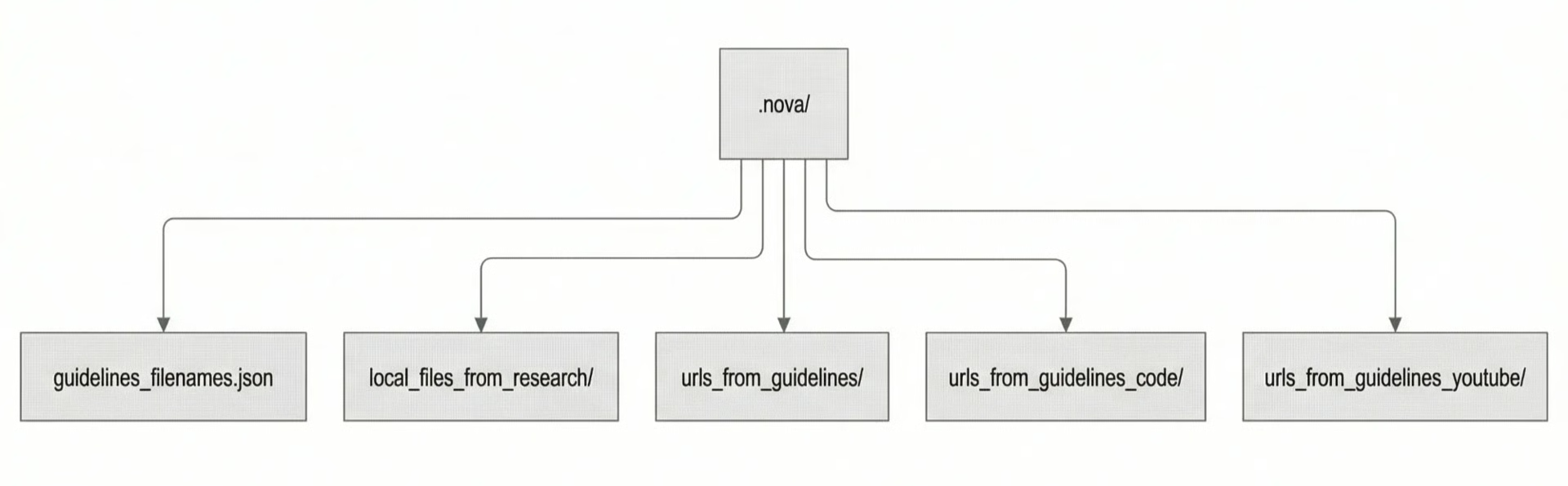 Image 1: A directory tree diagram showing the structure of the
 .nova/ folder and its contents after Steps 1-2 of the ingestion workflow.
This file-based approach ensures that all ingested content is persistent, auditable, and easily accessible for both the agent and for human inspection. In a production system, these files could be replaced by a database, but the principle of separating heavy content from the agent’s immediate context remains the same.
Handling Failures: Critical vs. Non-critical
Not all failures are equal. A robust agent must distinguish between critical errors that halt the workflow and non-critical ones that can be logged as warnings. Our server-hosted prompt includes a policy for this.
Here are some examples of this policy in action for our ingestion tools:
**extract_guidelines_urls**: If thearticle_guideline.mdfile is missing, this is a critical failure, and the agent must stop and ask the user for a valid path. However, if the file is present but contains no URLs, this is non-critical ; the agent simply proceeds with empty lists.**scrape_and_clean_other_urls**: If the guidelines contain URLs to scrape but every single scrape attempt fails, this is a critical failure. It suggests a systemic issue (like a network problem or invalid API key) that requires user intervention. If there are no URLs to scrape, it is a non-critical event.
This simple but effective policy makes the agent more resilient and less likely to fail silently.
Conclusion
In this lesson, we built a robust and token-efficient data ingestion layer for our MCP-based research agent. We implemented five specialized tools to handle diverse data sources, from local files and Jupyter notebooks to web pages, GitHub repositories, and YouTube videos. By using a file-first architecture and tools that return only concise summaries, the ingestion step stays scalable, cost-effective, and predictable.
You have seen how server-hosted prompts can define a discoverable and reproducible workflow, and how a clear failure policy can make an agent more resilient. The clean, structured, on-disk artifacts generated by this ingestion layer are now ready for use in the next phase of our agent’s workflow.
In the upcoming lessons, we will build on this foundation as we implement the research loops. The agent will use the ingested content to generate new search queries, run them through research APIs, and curate the results to build a comprehensive knowledge base, all leading to the final research.md file.
References
- Model Context Protocol. (n.d.). Tools. modelcontextprotocol.io/docs/concepts/tools
- Model Context Protocol. (n.d.). Prompts. modelcontextprotocol.io/docs/concepts/prompts
- Model Context Protocol. (n.d.). Resources. modelcontextprotocol.io/docs/concepts/resources
- Firecrawl. (n.d.). Firecrawl - The Web Data API for AI. firecrawl.dev
- Google AI for Developers. (n.d.). Video understanding. ai.google.dev/gemini-api/docs/video-understanding
- gitingest. (n.d.). Prompt-friendly codebase. gitingest.com
- Google Cloud. (n.d.). Video understanding. cloud.google.com/vertex-ai/generative-ai/docs/multimodal/vide...
- OpenAI. (n.d.). Model context protocol (MCP). OpenAI Agents SDK. openai.github.io/openai-agents-python/mcp
- Roth, E. (2024, November 25). Anthropic launches tool to connect AI systems directly to datasets. The Verge. theverge.com/2024/11/25/24305774/anthropic-model-context-...