Lesson 12: Central Project: Scope & Design
In Part 1 of this course, we clarified the distinction between structured LLM workflows and autonomous agents. You learned the role of context engineering as the primary method for shaping LLM outputs to match desired behaviors. This includes enforcing structured outputs, designing and granting tool use, and building RAG and memory systems. You also studied agent architectural patterns, such as ReAct. Together, these pieces form the core building blocks of AI engineering.
Now, in Part 2, we shift to practice. This lesson defines the central project you will build over the next ten lessons: a system of two specialized Agents collaborating to produce publish-ready technical articles. We will introduce Nova, an adaptable, steerable (ReAct-style) research agent implemented with the Model Context Protocol (MCP) and FastMCP. Nova focuses on automatic context ingestion from diverse sources like web pages, GitHub repositories, YouTube videos, and local files, and also runs iterative research rounds with Perplexity.
Alongside Nova (the research agent), we will design Brown, a reliable writing workflow implemented with MCP and LangGraph. Brown emphasizes determinism, statefulness, and auditability, using writing preferences and reflection scores to reduce the now commonly called “AI slop” writing style. This lesson covers the high-level architecture, rationales, and trade-offs for building this production-ready system, including a build-vs-buy analysis and the role of human-in-the-loop in each agent’s process.
Of course, the final design wasn’t obvious at first; it emerged through multiple iterations during development (causing delays in releasing this course). After initial brainstorming, we attempted a single monolithic system for research and writing, but soon realized it wasn’t ideal. Research and writing required different architectural patterns: research benefited from an open-ended, flexible approach, while the writing process needed something more deterministic and predictable.
We therefore split the system into two. That decision clarifies when to prefer steerable agents for exploration and when to rely on stable workflows for quality. The project also shows how to integrate external tools without increasing token costs and how to design for essential features like pause/resume, monitoring, and auditability. This lesson explains the rationale for that split so you can practice AI engineering choices that emphasize core concepts and problem-fit, rather than chasing a single “perfect” framework in a fast-moving ecosystem.
A Quick Primer on LangGraph, MCP, and FastMCP
To give you more context for understanding the rest of this lesson, here’s a primer to LangGraph, MCP, and FastMCP. Keep in mind that we’ll cover them in more depth later in the course, so don’t worry if there are concepts that are not fully explained yet. What is important here is to understand how the central project of the course is structured and the reasoning behind it.
- LangGraph is a framework that lets you easily build stateful LLM workflows as graphs with nodes (steps) and edges (branches). It implements checkpoints to persist state so runs are resumable (e.g., if a scraper times out at step 5 of 9, you can restart from step 5) and auditable (e.g., reviewers can see exactly what the model inputs and outputs were at each step), and has other features that are useful to deploy AI agents for production.
- The Model Context Protocol (MCP) is an open, model-agnostic way for LLMs to call external capabilities via a client–server pattern. An MCP server exposes tools (actions like “search” or “scrape”), resources (read-only data such as files, URLs, repo trees), and prompts (reusable instruction templates). An MCP client discovers these at runtime and can invoke them. Examples of MCP clients include Cursor [32] and Claude Code [33]. Another example of an MCP server is the Notion MCP server [34].
- FastMCP is a lightweight Python framework for quickly building MCP servers/clients. Think of it as “FastAPI for MCP ” : it lets you define endpoints as tools/resources, run locally, hot-reload, and iterate fast.
Now that we’ve covered the basics, let’s dive into the central project of the course.
The Build vs. Buy Trade-off: Why Not Just Use Off-the-Shelf Tools?
Before writing a single line of code for a custom AI system, you must answer a question: Should you build this? Off-the-shelf “Deep Research” tools from OpenAI, Google, and Perplexity are fast, polished, and convenient. For many general use cases, they are the correct answer. But they were not for us. Since we wanted specific features, the only viable path was to build our own solution.
Our core problem was to turn a single input into in-depth research and then into a structured technical article in a specific, opinionated style. The input is an “article guideline”, a short single-file specification that defines objectives, audience, scope, structure, voice, required sources, constraints, and any required assets such as diagrams (Mermaid), tables, or images. Meeting those constraints needed more control than off-the-shelf tools allow.
On the research side, we wanted the ability to guide the research midstream, approve subsequent search queries, and weave in context from diverse sources such as local files, GitHub repositories, and YouTube videos.
On the writing side, we required a deterministic writing process with style gates, reflection scores, and auditable checkpoints to guarantee consistent quality and adherence to our writing profile. General tools do not reliably provide this level of precision or integration.
So, we adopted a hybrid strategy: use commodity capabilities where they excel, and build only what the market doesn’t provide. For example, we rely on Perplexity’s API for real-time, cited web search that supports multi-round research, rather than building our own web scraper. This lets us focus our efforts on custom orchestration, policies, and quality guarantees.
Table 1 summarizes the specific limitations we encountered that guided our decision.
| Capability | Off-the-Shelf Tool Limitation | Our Custom System’s Advantage |
|---|---|---|
| Custom Structure | We could not programmatically require specific sections, layouts, or the generation of Mermaid diagrams. | Enforceable contracts with required sections, diagrams, or tables are baked directly into the workflow. |
| Stylistic Control | There was no reliable way to ban "AI slop" or automatically enforce our personal writing preferences. | An automated "style judge" step in the workflow enforces tone, bans overused terms, and triggers revision loops. |
| Planning Heuristics | We needed to prioritize academic sources over blogs, but the tools did not let us inject that rule. | Custom heuristics and evaluation criteria steer research toward higher-quality, more authoritative sources. |
| Integration Contract | Piping the output into a CI/CD pipeline was brittle; there was no versioned, structured contract for the output. | Structured JSON schemas govern handoffs, enabling replay, testing, and long-term maintainability. |
| Context Ingestion | Most tools rely on manual source uploads (such as NotebookLM), which slows down iteration and is not scalable. | Automated ingestion of URLs, repositories, and local files removes the manual bottleneck. |
Table 1: Build vs. Buy Comparison for a Custom Research & Writing System
Why LLMs Still Struggle at Writing (and How to Fix It Manually)
LLMs have proved helpful for small writing tasks like drafting emails or clarifying/summarizing text. However, their use comes with a set of quirks. We have all seen the generic voice, the excessively “flowery” style, the verbosity, the hedging, formulaic openings and closings, and that unmistakable “AI sound.” You have probably encountered countless examples like this: “It is not just about X - it is about Y,” which adds words but no real substance.
It is a systemic issue that impacts the authenticity and credibility of content. Following the public release of models like ChatGPT, there has been a noticeable increase in certain stylistic terms in professional and scientific writing. Analyses of the PubMed database show a spike in terms like “meticulous,” “commendable,” and “intricate” starting in 2023, consistent with widespread LLM-assisted drafting [1], [2]. The word “delve” saw its usage frequency increase by over 650% between 2020 and 2023 [1].
A plausible cause for this phenomenon comes from the reinforcement learning from human feedback (RLHF) stage (our video about RLHF here for more details), also called “preference tuning”, a common step in the creation of LLMs. Preference tuning rewards outputs that human raters “like.” If a significant portion of these raters favor a certain formal, slightly verbose phrasing, then the model learns to overvalue and produce that style more often. When millions of users then copy and publish this AI-authored phrasing, the style feeds back into the public web and scientific corpora, amplifying the loop. The result is the AI voice/slop : language that is easy to spot and feels inauthentic.
Thus, we treat these stylistic tells as bugs that need to be caught and removed. Our writing workflow is designed to enforce clarity over puffery and to prioritize narrative over needless bullet points. Beyond just banning words, we enforce strict rules for mechanics and structure to ensure high-quality output. Our system will actively ban specific markers of AI slop, such as ‘leverage,’ 'harness,’ ‘navigate,’ ‘tapestry,’ ‘endeavour,’ and ‘pivotal,’ along with formulaic phrases.
We also enforce:
- Mechanics: Active voice, domain-appropriate abbreviations, and specific targets for sentence and paragraph length, along with consistent tense.
- Structure: Proper code block formatting, correct placement of figures, and reliable rendering of diagrams.
- Media: Using media as input context during generation (like figures or transcripts) and emitting media (such as mermaid diagrams) as part of the final output.
- App Layer: For the final output, we rely on an application layer to render media, package all artifacts, and integrate with our website or CI/CD pipeline.
We emphasize the following point: if you do not actively constrain an LLM’s style, you will get statistically safe, generic language. To achieve high-quality output that truly reflects your voice, you have to be prescriptive and deliberate.
Here are the manual best practices that work today, which our system will automate to ensure consistency and quality:
- Don’t outsource your thinking: This is very important. Even if you use AI tools to write, you should always bring your own outline, ideas, angles, and expertise to the table first.
- Front-load context: Attach all source documents and data, and strictly forbid external speculation by the model.
- Be prescriptive: Specify the audience, tone, desired length, overall structure, a list of banned words, allowed jargon, and precise formatting rules.
- Combat verbosity: Enforce word economy and aim for a high insight-per-sentence ratio. We like concise, clear, and logical explanations.
- Maintain an anti-slop list: Keep a running ban list of overused AI tells.
- Iterate deliberately: Ask for specific revisions, not just generic “edits,” as models often summarize (removing important details) instead of truly improving.
- Use cross-model critique: Have one model critique another’s draft to spot unsupported claims and stylistic slop.
- Relentless fact-checking: Reread, check that the text follows a clear logic, demand citations, spot-check claims, and verify dates rigorously.
These tactics are effective but repetitive and painful to implement manually. That is why we are building a system to automate them.
Two Agents, Two Philosophies
You rarely design a perfect system on day one. Our initial plan was to build everything using a single framework, but we learned that a one‑framework‑for‑everything approach was ineffective. The problem shapes diverged, and so did our tools.
Our research agent prioritizes steerability. We first built it as a static LangGraph workflow with predefined steps, which gave us determinism but limited how easily we could change course mid‑run. In practice, research is interactive, requiring us to pivot queries, accept user feedback at the right moments, and fan out tool use. We therefore moved to a ReAct‑style loop and chose the Model Context Protocol (MCP) so the same research recipe could travel across hosts. In our case, we define a single prompt that describes the “agentic recipe” for the research process [3], [4], [5] and use MCP to expose a set of tools, resources, and prompts. MCP is an open standard that provides a model‑agnostic interface for connecting to external tools and data sources. The client–server MCP architecture lets the client discover capabilities at runtime and use them.
At the same time, human‑in‑the‑loop approvals and pauses (that came by default with LangGraph) are implemented in the client or host UI rather than guaranteed by the protocol itself [6], [7]. For development, we used FastMCP’s in‑memory connection to keep development iterations fast.
Our writing agent prioritizes reliability. For this task, which needs auditability and durability, we kept orchestration in LangGraph and integrated MCP tools where useful. We use the LangGraph Functional API to manage the multi‑stage state machine for outline, draft, reflection, and refinement, and we call MCP‑exposed tools for specific actions. This preserves state persistence, explicit evaluation rules, and self‑critique passes to fix stylistic defects [10], [11], [12], [13]. Human‑in‑the‑loop checks protect process integrity, and the graph structure supports cyclical edits and conditional branching where needed [14], [15].
The key takeaway, as mentioned in Lesson 2: LLM Workflows vs. AI Agents: When the process is exploratory and unpredictable, prefer a steerable agent, and when the process is well defined and long-running, use a stateful workflow with checkpoints and monitoring. LangGraph can support interactive research, so our switch was not about capability limits. We switched from a static LangGraph workflow to a ReAct‑style agent to increase flexibility, then adopted MCP so the research recipe could be used across clients, and we used FastMCP’s in‑memory development path, knowing we would rebuild some orchestration features ourselves.
In the next lesson, we will go deeper into LangGraph, FastMCP, and other agent frameworks, and explain why we chose LangGraph to power the writing system.
Agents Design
With the high-level philosophy established, let’s look at the concrete architecture. We organize the entire system around a central handoff artifact: the research.md file. The research agent produces it, and the writing agent consumes it.
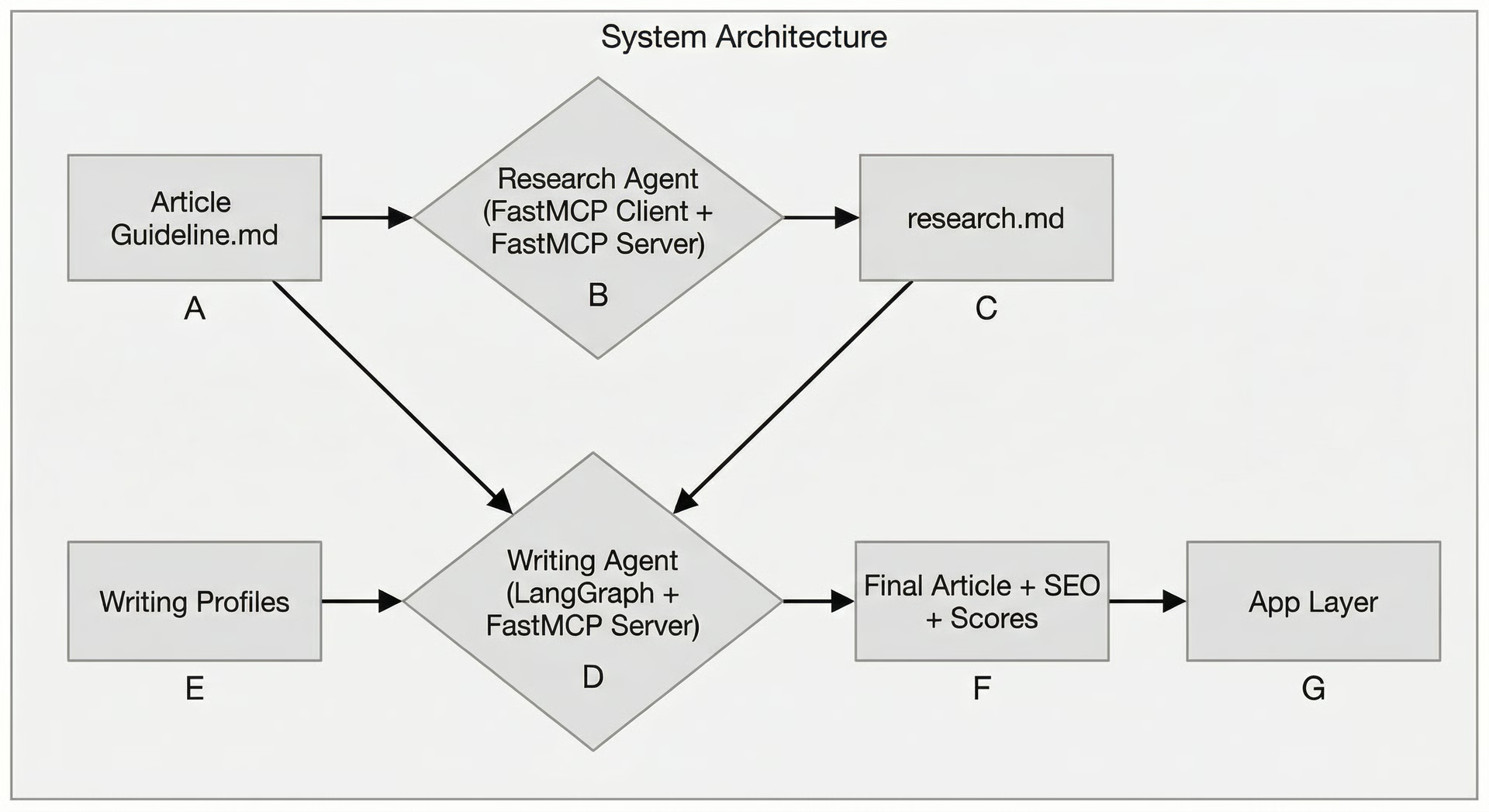 Figure 1: High-level architecture of the two-agent system.
Research Agent (Nova)
Nova focuses on flexible, steerable research. It takes an “article guideline ”**** file (explained above) and produces a comprehensive research document.
- Inputs: An
article_guideline.mdfile containing the topic, audience, outline, and candidate sources. - Outputs: A
research.mdfile with curated notes, citations, and collapsible sections.
A single MCP prompt defines the agent’s entire workflow, acting as an “agentic recipe” [16], [17], [18], [19]. This makes the process transparent and allows any MCP-compatible client to execute the research. The workflow consists of six main stages:
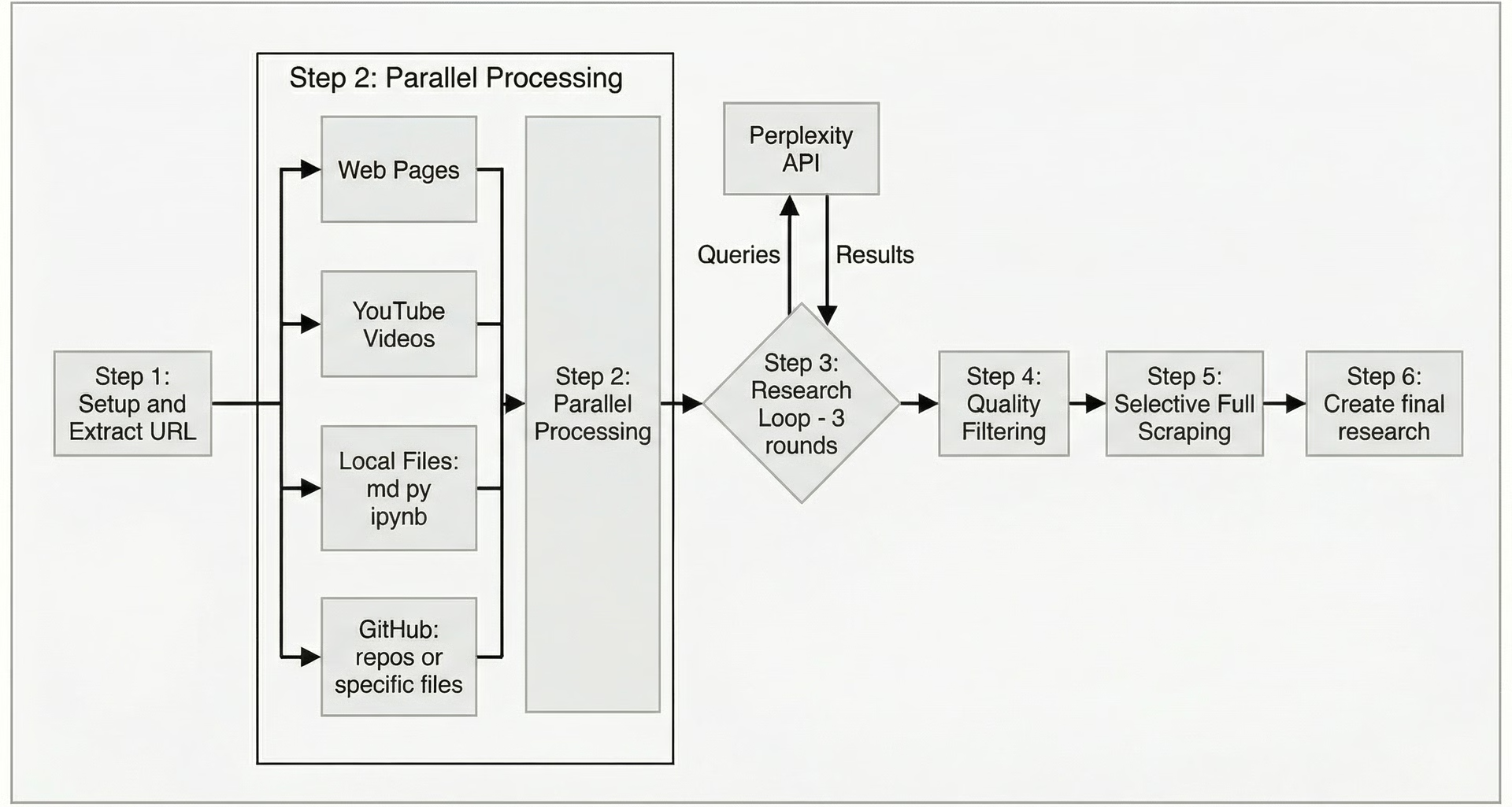 Figure 2: Workflow of the Nova research agent.
- Setup: The agent starts the research “recipe” by extracting content from all source references (URLs, local files, GitHub content, YouTube links) from the article guideline.
- Parallel Processing: It processes all initial sources simultaneously, copying local files, scraping web pages, summarizing GitHub repositories, and transcribing YouTube videos.
- Research Loop (3 Rounds): It analyzes the existing material to identify knowledge gaps, generates new search queries, and uses the Perplexity API to find answers [20], [21], [22], [23], [24].
- Quality Filtering: The agent automatically evaluates all sources for trustworthiness and relevance, keeping only the high-quality ones.
- Selective Full Scrapes: It identifies up to five of the most authoritative sources and performs a deep scrape of their full content.
- Final Research File: The agent consolidates all curated materials into the final
research.mdfile.
We also set a Critical Failure Policy: if any tool/step fails completely (e.g., 0 out of 7 URLs scraped), the agent stops immediately and asks for human guidance. This prevents silent failures and ensures data integrity.
Writing Agent (Brown)
While Nova handles exploratory research, Brown manages the structured, reliable drafting process for the article. Brown implements its workflow in LangGraph, making it deterministic, stateful, and auditable [25], [26], [27], [28], [29], [30], [31].
- Inputs: The
article_guideline.md, theresearch.mdfile from Nova, and writing profiles. - Outputs: The final
article.md, SEO metadata, and other artifacts.
The workflow is a state machine that moves the article through distinct stages, from initial context gathering to finalization.
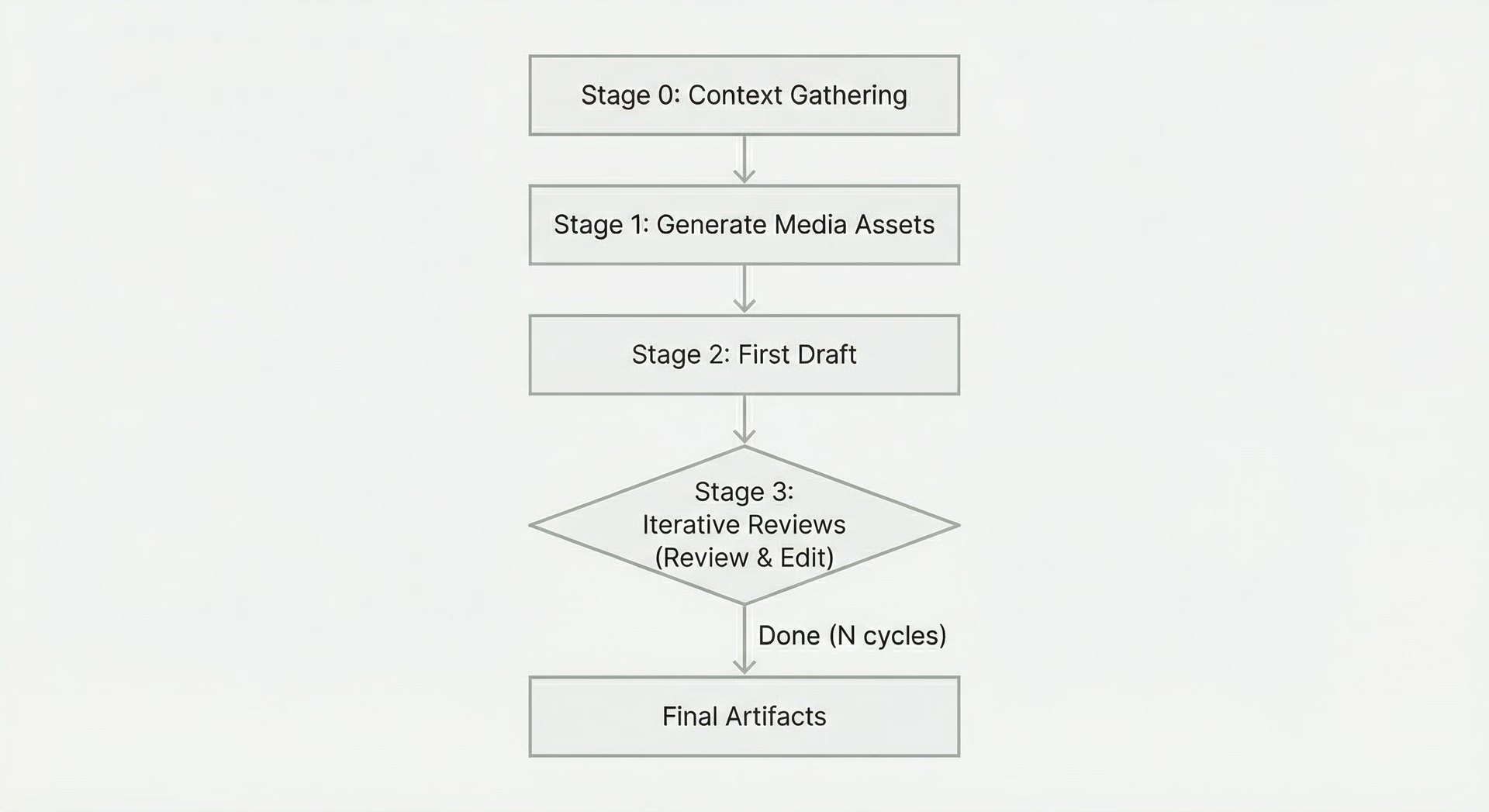 Figure 3: Workflow of the Brown writing agent.
Core logic of Brown, our writing agent:
- Stage 0 - Context Gathering: Load all inputs.
- Stage 1 - Generate Media Assets: Before writing the article, generate all the required media assets in parallel using the orchestrator-worker pattern based on the article guidelines.
- Stage 2 - First Draft: Following the article guidelines, research, and generated assets,create the first draft of the article.
- Stage 3 - Iterative Reviews: Use the reflection pattern to review the article draft against all expected writing profiles and then automatically edit the article based on them. This is repeated a given number of times.
To properly incorporate human validation into the process, the writing agent also supports on-demand editing, applying the same reflection logic, along with human feedback, to specific sections of text selected by the user.
As an example of an end-to-end workflow, if the guideline says, “Explain MCP prompts,” the research agent extracts links to MCP documentation, finds more sources via Perplexity, and compiles everything into research.md. The writing agent then takes that research, drafts the section, runs it through the style-check loop, and emits the final text along with a Mermaid diagram block, which our app layer then renders.
Conclusion
We designed this system around a core philosophy: use steerability for exploration and reliability for quality. This split between a research agent and a writing workflow clarifies responsibilities, reduces unintended coupling, and makes the entire process more robust. This approach helps us future-proof our AI engineering decisions by focusing on core concepts and problem-fit, rather than chasing a single perfect framework in a fast-moving ecosystem.
This clear division also sets the stage for Part 3 of the course, where we will dive into evaluation and observability. Because each agent produces inspectable artifacts, such as the research.md file and detailed reflection scores, we can easily apply metrics, trace behavior, and audit the results. This ensures our agent system is not just functional, but also reliable and transparent. The entire loop, spanning from initial inputs to human-in-the-loop agenting and polished outputs, is facilitated by automatic context ingestion and a dedicated media application layer.
In the next lesson, we will compare different Agent frameworks, comparing FastMCP and LangGraph, and justifying our choices in greater detail. Then, from Lessons 15 to 22, we will walk through the complete, hands-on implementation of both the research and writing agents, turning this design into a functional, production-minded system.
References
- [1] Delving into PubMed Records: Some Terms in Medical Writing Have Drastically Changed after the Arrival of ChatGPT
- [2] Why Does ChatGPT “Delve” So Much? Exploring the Sources of Lexical Overrepresentation in Large Language Models
- [3] What is the Model-Context Protocol (MCP) and how does it facilitate steerable, human-in-the-loop AI agent workflows?
- [4] Model Context Protocol
- [5] What is the Model Context Protocol (MCP) and how does it facilitate steerable, human-in-the-loop AI agent workflows?
- [6] What is the Model Context Protocol (MCP)?
- [7] MCP Server
- [8] Human-in-the-Loop for AI Agents: Best Practices, Frameworks, Use Cases, and Demo
- [9] Steerable Deep Research: Building Production-Ready Agentic Workflows with Controlled Autonomy
- [10] LangGraph
- [11] Overview
- [12] A Deep Dive into LangGraph for Self-Correcting AI Agents
- [13] Build a Self-Reflective Deep Research Agent using LangGraph
- [14] Human in the Loop Workflows
- [15] Building AI Agents with LangGraph
- [16] What is the Model Context Protocol (MCP)? An introduction
- [17] Model Context Protocol Docs
- [18] Model Context Protocol Specification
- [19] What is Model Context Protocol (MCP)?
- [20] How to use the Perplexity API
- [21] Introducing the Perplexity Search API: Real-time, Factual Answers from the Web
- [22] API Settings
- [23] Introducing the Sonar Pro API: Our Most Advanced Model for Generative Search
- [24] Perplexity API Documentation
- [25] Agentic AI frameworks for building generative AI applications on AWS
- [26] Why LangGraph?
- [27] LangGraph by LangChain
- [28] Build intelligent, agentic workflows with LangGraph and Granite
- [29] LangChain vs. LangGraph: What’s the Difference?
- [30] Frequently Asked Questions
- [31] How to think about Agent Frameworks
- [32] LangGraph: Building a Self-Correcting Agent for Code Generation
- [33] Agentic RAG with LangGraph
- [34] LangChain vs LangGraph: A Comprehensive Comparison
- [35] Cursor
- [36] Claude Code
- [37] Notion MCP Server