Lesson 13: Agent Frameworks Overview & Comparison
In the previous lesson, we introduced the two capstone projects we will build: an adaptable research agent and a reliable writing agent.
That leaves us with a critical decision: which framework should we use to build these projects? The ecosystem is new, evolving quickly, and crowded with options. Choosing for the wrong reasons can lock you into brittle abstractions; choosing too late can stall a project. This lesson is a guide to making that decision. We will compare the most popular libraries: LangGraph, OpenAI Agents SDK, AgentKit, CrewAI, PydanticAI, AutoGen, Claude Agent SDK, and FastMCP by focusing on their philosophies, abstractions, and trade-offs, not just their APIs.
We will anchor this comparison in our capstone architecture. You will learn how we evaluated the options, why we changed direction mid-build, and how to reason about framework choice under uncertainty. As you read, keep two concepts in mind: LangGraph’s interrupts and checkpoints , which enable auditable, resumable workflows, and the Model Context Protocol (MCP) as your interoperability layer (think “USB-C for AI,” so tools you build today can plug into multiple runtimes tomorrow).
We will show how this plays out in practice: our research agent ships as a FastMCP server, while our writing system uses a LangGraph workflow that calls MCP tools.
Image 1: High-level architecture diagram illustrating the two capstone builds: an adaptable research agent and a reliable writing hybrid agent, showing their client-server interactions.
Framework Choice Under Uncertainty and Why Some Selection Strategies Fail in Production
The AI agent ecosystem is new and evolving quickly, and no universal framework will satisfy every use case. This landscape is often confusing because different types of tools are frequently lumped together. To make an informed choice, you must first understand the distinct roles these tools play.
A runtime (e.g., LangGraph, CrewAI, PydanticAI, OpenAI Agents SDK, AgentKit, AutoGen) orchestrates an agent’s behavior, managing its state and control flow. A protocol (e.g., Model Context Protocol, MCP) standardizes how agents access tools and resources, ensuring that a tool built for one runtime can be used by another. Finally, a tooling framework (e.g., FastMCP) helps you implement that protocol, making it easier to build and deploy these interoperable tools.
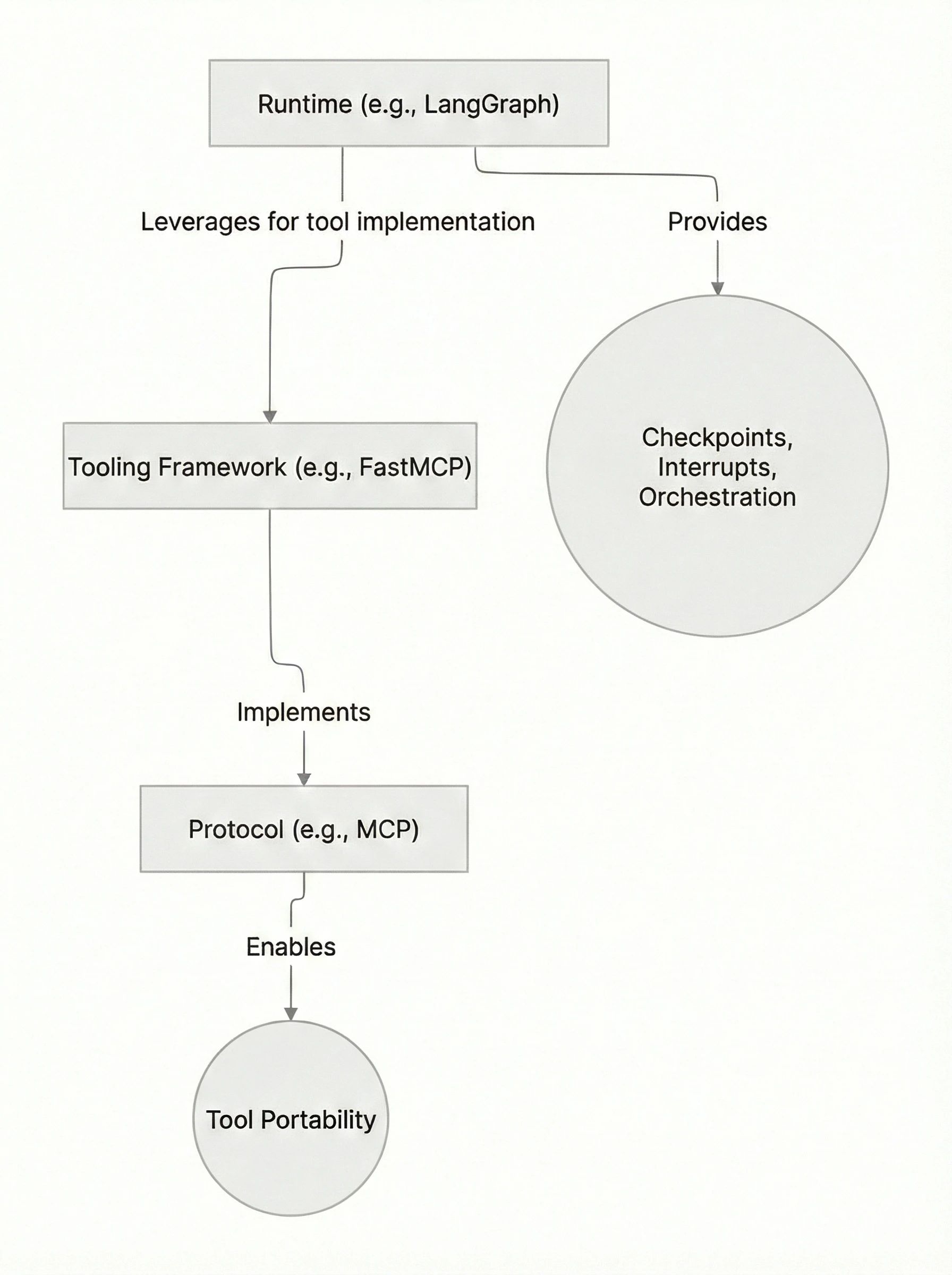 Image 2: Diagram illustrating the relationships and functionalities of Runtime, Protocol, and Tooling Framework.
These components solve different production problems. A runtime like LangGraph provides reliability features like checkpoints and interrupts for durable, auditable execution. A protocol like MCP provides tool portability, freeing you from vendor lock-in. A tooling framework like FastMCP provides the servers, clients, and transports needed to make that protocol production-ready.
A common mistake is choosing a framework based on hype or a simple “Hello, World” example without considering the real demands of a production system. This often leads to one of two traps: either you pick a framework that is too simple and lacks the reliability primitives for your use case, or you choose one that is too complex and imposes unnecessary overhead.
We learned this firsthand. We initially planned to build our research agent with a static LangGraph workflow. However, we quickly realized that research is an interactive and divergent process. We needed to add tools, pivot strategy, and replan on the fly. A rigid graph was a wrong fit. Instead, we moved the “work” into portable MCP tools and kept the orchestration light. For the writing agent, which required a repeatable, auditable process, we did the opposite: we used LangGraph for its explicit state management and checkpoints, ensuring a durable and observable workflow.
A Theory for Choosing: Decision Axes Instead of Brands
To avoid these traps, you need a way to evaluate frameworks based on principles. Here are four decision axes that can help you analyze any new library and determine if it fits your project’s needs.
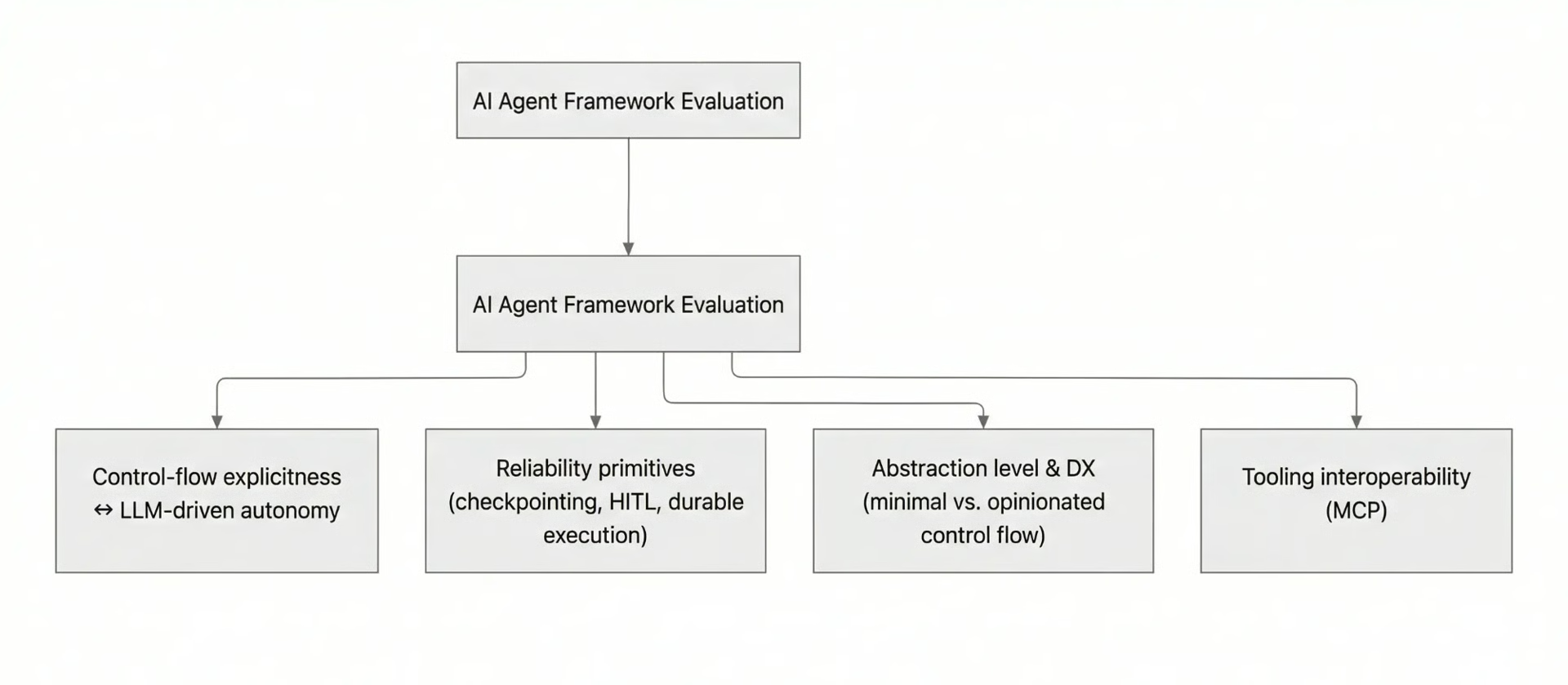 Image 3: A diagram illustrating the four key decision axes for evaluating AI agent frameworks.
- Control-Flow Explicitness vs. LLM-Driven Autonomy : Frameworks exist on a spectrum of control. At one end, graph-based systems like LangGraph give you explicit control over every state transition. This is ideal for deterministic, auditable workflows where you need to know precisely why the system made a particular decision. At the other end, agent loops with minimal primitives, like the OpenAI Agents SDK, favor LLM-driven autonomy. This is better for exploratory tasks where the path to a solution is not known in advance. The question to ask is: Does your application require repeatable, auditable steps, or does it need to navigate an unpredictable environment?
- Reliability Primitives : Production systems fail. A good framework provides tools to handle those failures gracefully. Look for features like checkpointing (saving the agent’s state), time-travel/replay (re-running a process from a saved state), human-in-the-loop (HITL) interrupts (pausing for human approval), and durable execution (surviving restarts). LangGraph emphasizes interrupts and persistence, while PydanticAI integrates with systems like Temporal and DBOS for durable execution.
- Abstraction Level and Developer Experience (DX) : Frameworks offer different levels of abstraction. Some, like the OpenAI Agents SDK, provide a minimal set of primitives (Agents, Tools, Guardrails), giving you flexibility at the cost of more boilerplate. Others, like CrewAI, offer opinionated constructs (Crews, Flows) that speed up development but may be less flexible. High-level abstractions are great for building quickly, but the ability to drop to a lower level for fine-grained control is critical when you encounter edge cases.
- Tooling Interoperability (MCP) : To avoid rewriting your integrations every time you switch runtimes, treat your tools as standalone components. The Model Context Protocol (MCP) acts like a “USB-C for AI,” providing a standard interface for tools. By building your tools as MCP servers (for example, with FastMCP), you can plug them into any framework that speaks the protocol, including LangGraph, the OpenAI Agents SDK, or even IDEs like Cursor.
Our capstone projects clearly map to these axes. The research agent requires autonomy and interoperable tools for its exploratory nature, making a lightweight loop with MCP a good fit. The writing agent demands an explicit, auditable workflow with reliability primitives, making LangGraph the better choice.
The Landscape Today: Frameworks, Philosophies & Adoption Snapshot
With these decision axes in mind, let’s survey the current landscape of agent frameworks.
- LangG****raph : Best for stateful, auditable workflows. It uses a graph-based model with built-in support for checkpoints and interrupts, making it ideal for processes that need to be resumable and traceable.
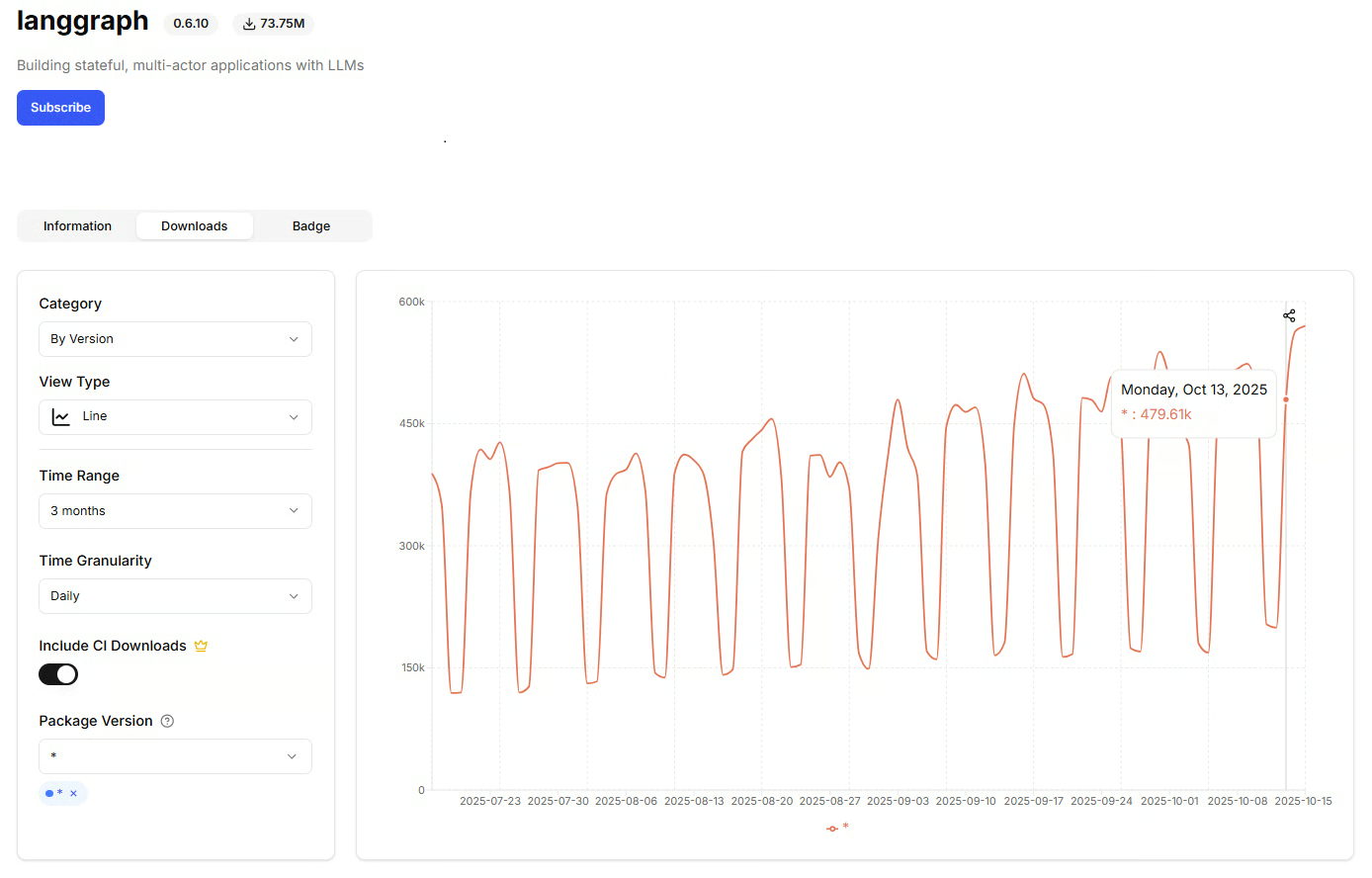 Source: pepy.tech, daily downloads for LangGraph, accessed October 15, 2025.
LangGraph has strong, consistent daily download activity, averaging around 400K–500K downloads per day over the past three months.
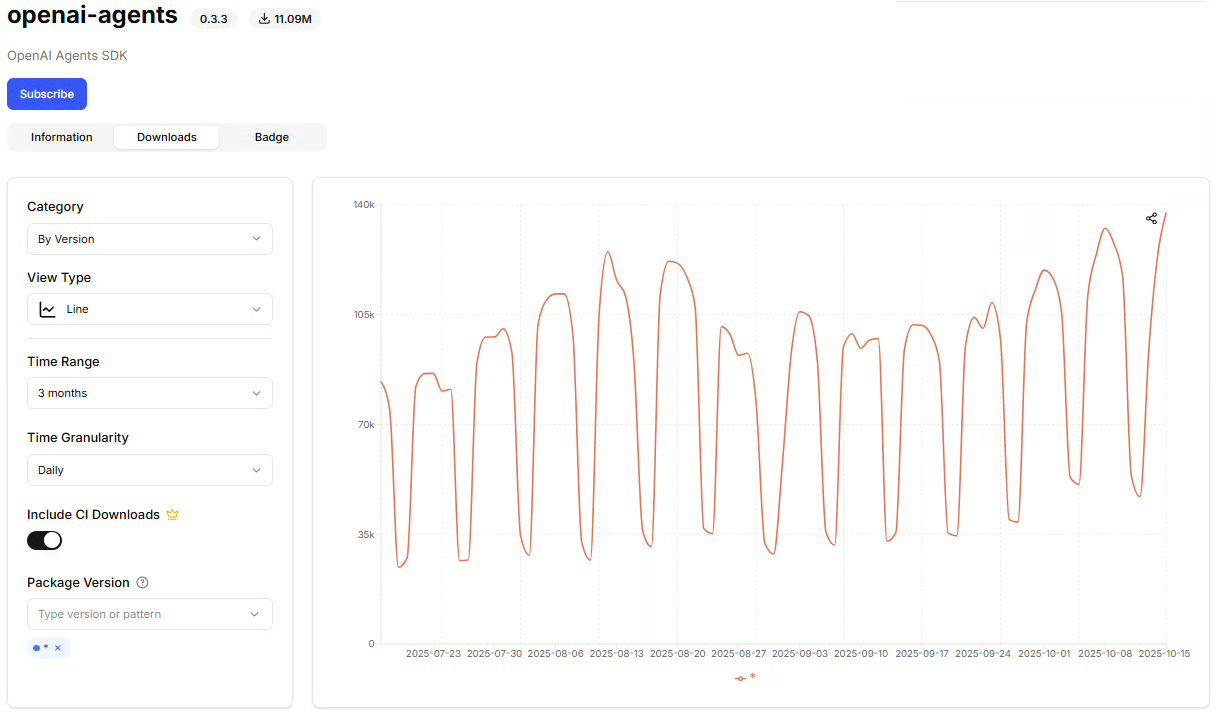 Source: pepy.tech, daily downloads for OpenAI Agents SDK, accessed October 15, 2025.
The OpenAI Agents SDK library has recorded 90K–120K daily downloads over the past three months, with a slight upward trend.
- OpenAI’s AgentKit : A modular toolkit for building, deploying, and optimizing agents across the OpenAI platform. It unifies visual design (Agent Builder), frontend integration (ChatKit), and performance optimization (Evals) into one workflow. Developers can visually compose multi-agent systems, manage connectors, and embed chat-based experiences directly in their products—all backed by versioning, guardrails, and evaluation tools for safe, reliable deployment.
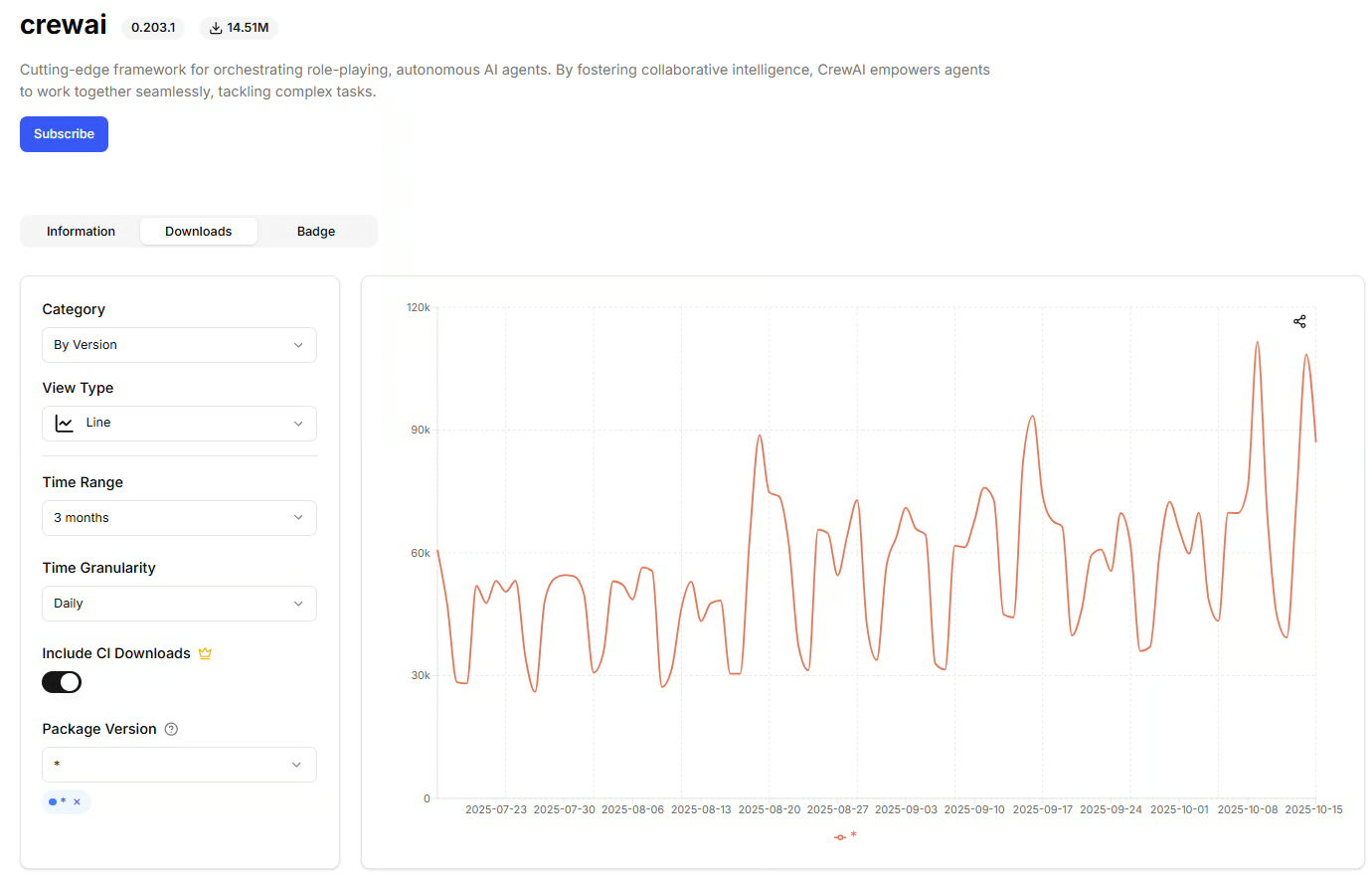 Source: pepy.tech, daily downloads for Crewai, accessed October 15, 2025.
The CrewAI library has daily downloads ranging between 40K and 100K.
- PydanticAI : The “FastAPI for agents.” It prioritizes type safety, data validation, and durable execution through integrations with Temporal and DBOS. It shines when correctness and structured data are critical.
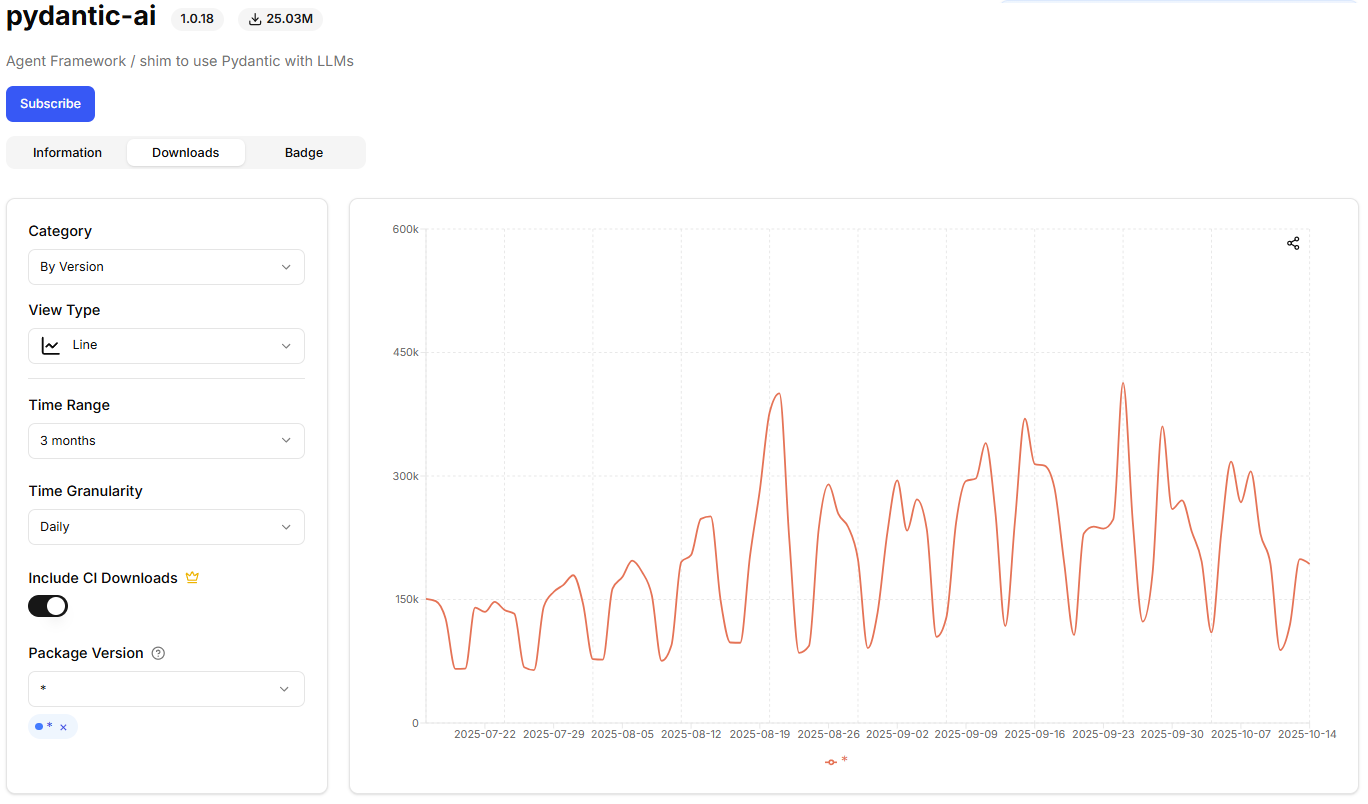 Source: pepy.tech, daily downloads for PydanticAI, accessed October 15, 2025.
Daily downloads of Pydantic-AI doubled from ~150k in July to 300- 450k by October 2025, demonstrating strong growth momentum.
- AutoGen : A flexible framework with a layered design. AutoGen Studio provides a GUI for no-code prototyping, making it an excellent exploration lab. However, Studio is explicitly not for production; for that, you would use the underlying AgentChat or core libraries.
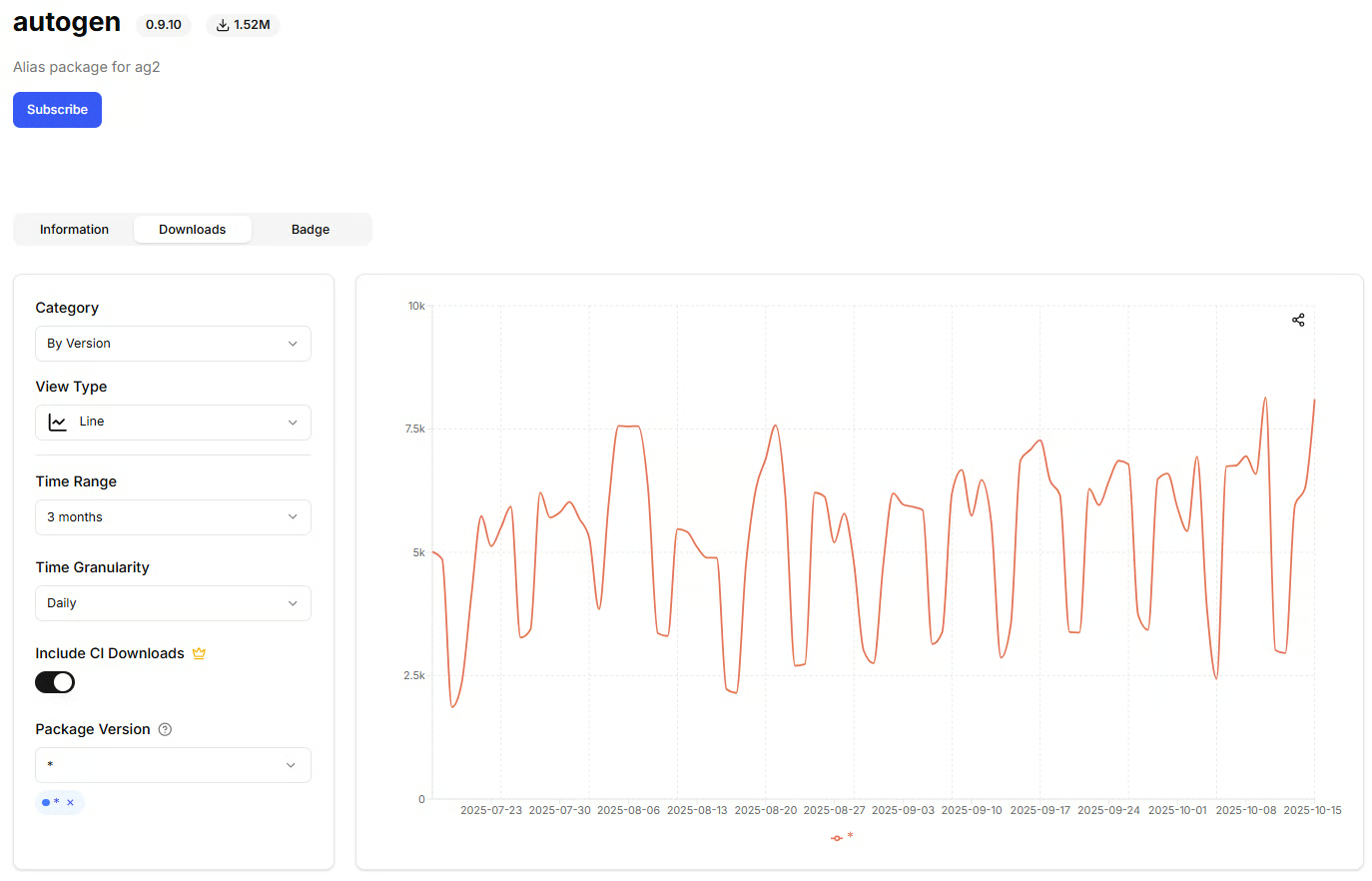 Source: pepy.tech, daily downloads for autogen, accessed October 15, 2025.
AutoGen had about 10k daily downloads recently.
- Claude Agent SDK : A newer entrant from Anthropic, designed to integrate tightly with Claude models. It focuses on providing robust tool use and orchestration capabilities tailored to the strengths of their model family.
- FastMCP : Not a runtime, but a framework for building MCP servers and clients. It provides the “USB-C ports” for your tools, ensuring they are portable across different runtimes and stacks. It also includes production-ready features like authentication and cloud deployment.
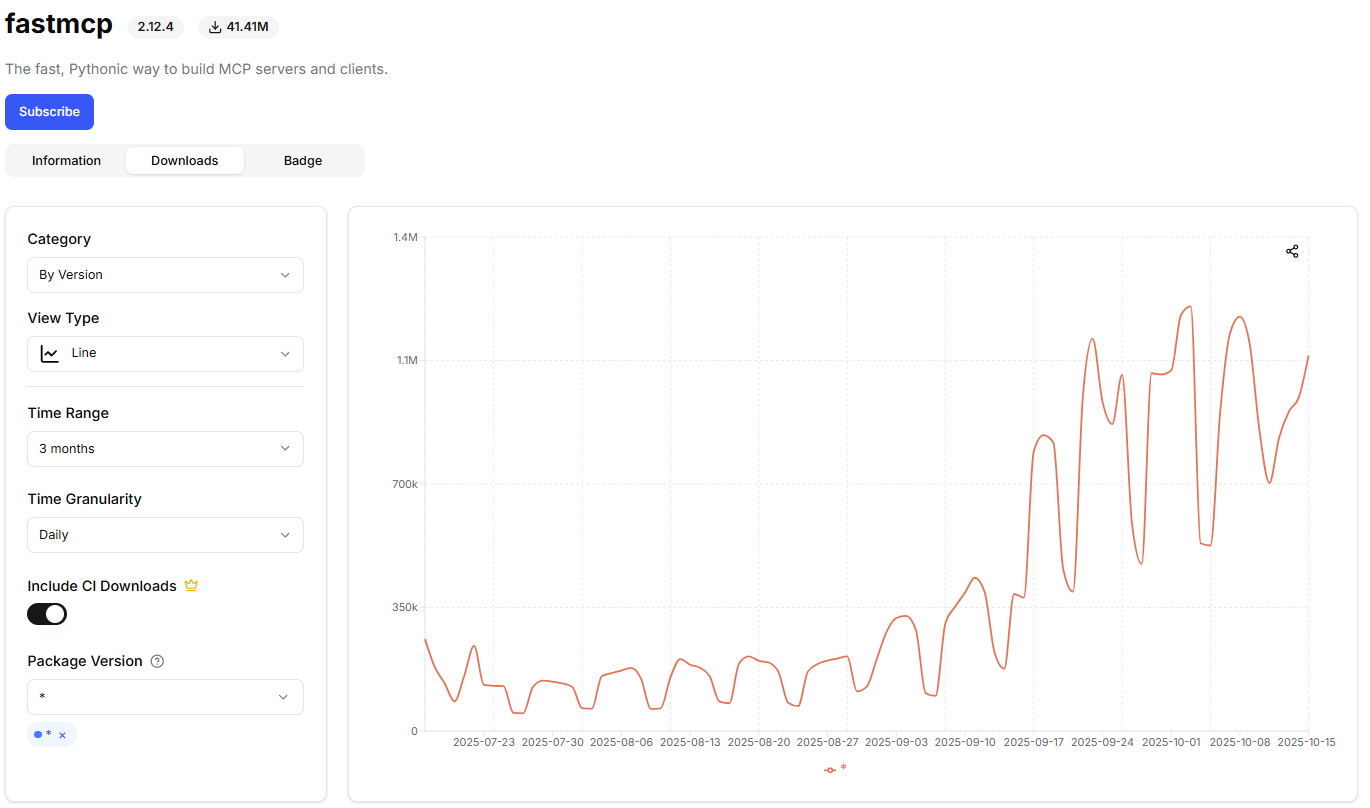 Source: pepy.tech, daily downloads for FastMCP, accessed October 15, 2025.
FastMCP demonstrates explosive growth, with daily downloads surging from ~250k in July to peaks of over 1.2M per day in October 2025, a 5x increase over three months.
To get a further sense of community energy, you can look at GitHub stars as of September 17, 2025. While stars do not equal quality, they can be a useful proxy for ecosystem maturity and hiring risk.
Image 4: Bar chart showing GitHub star counts for AI agent frameworks as of September 17, 2025.
Framework Deep Dive: LangGraph
LangGraph is designed for building stateful, auditable applications. Its core philosophy is that you model your logic as a graph, where each node is a function and edges represent the transitions between them. This structure allows you to create complex, multi-step workflows that can be paused, inspected, and resumed at any point.
The key production features are interrupts and persistence. With interrupts , you can pause the graph to wait for human approval before proceeding. With persistence (or checkpointing), the state of the graph is saved at each step. This enables not only long-running work but also time-travel debugging , where you can replay a workflow from any previous checkpoint to understand how it reached a particular state.
LangGraph offers two ways to define these graphs: a “graph API” and a “functional API.” The graph API is more explicit, requiring you to define a StateGraph object and then add nodes and edges step-by-step (e.g., workflow.add_node(...), workflow.add_edge(...)). The functional API is a more recent, concise alternative that uses decorators to define the graph, making the code look more like a standard Python application while still compiling down to the same stateful graph.
However, this power comes at a cost. Modeling control flow as an explicit graph is more work than simply letting an LLM plan its own steps. The learning curve is steeper, but the payoff is determinism and safety. For simple scripts or one-off flows, LangGraph may be overkill, but for the repeatable and auditable process of our writing agent, it is the right tool.
Framework Deep Dive: OpenAI Agents SDK
In contrast to LangGraph’s explicit graph model, the OpenAI Agents SDK offers a minimal set of primitives, designed to be lightweight and easy to learn. Its philosophy is to provide just enough structure to build powerful applications without a steep learning curve.
The SDK is built around five core concepts:
- Agents : LLMs equipped with instructions and tools.
- Tools : Python functions that agents can call to interact with the outside world.
- Guardrails : Mechanisms for validating agent inputs and outputs to ensure safety and correctness.
- Handoffs : A way for agents to delegate tasks to other, more specialized agents.
- Sessions : Automatically manage conversation history across multiple runs.
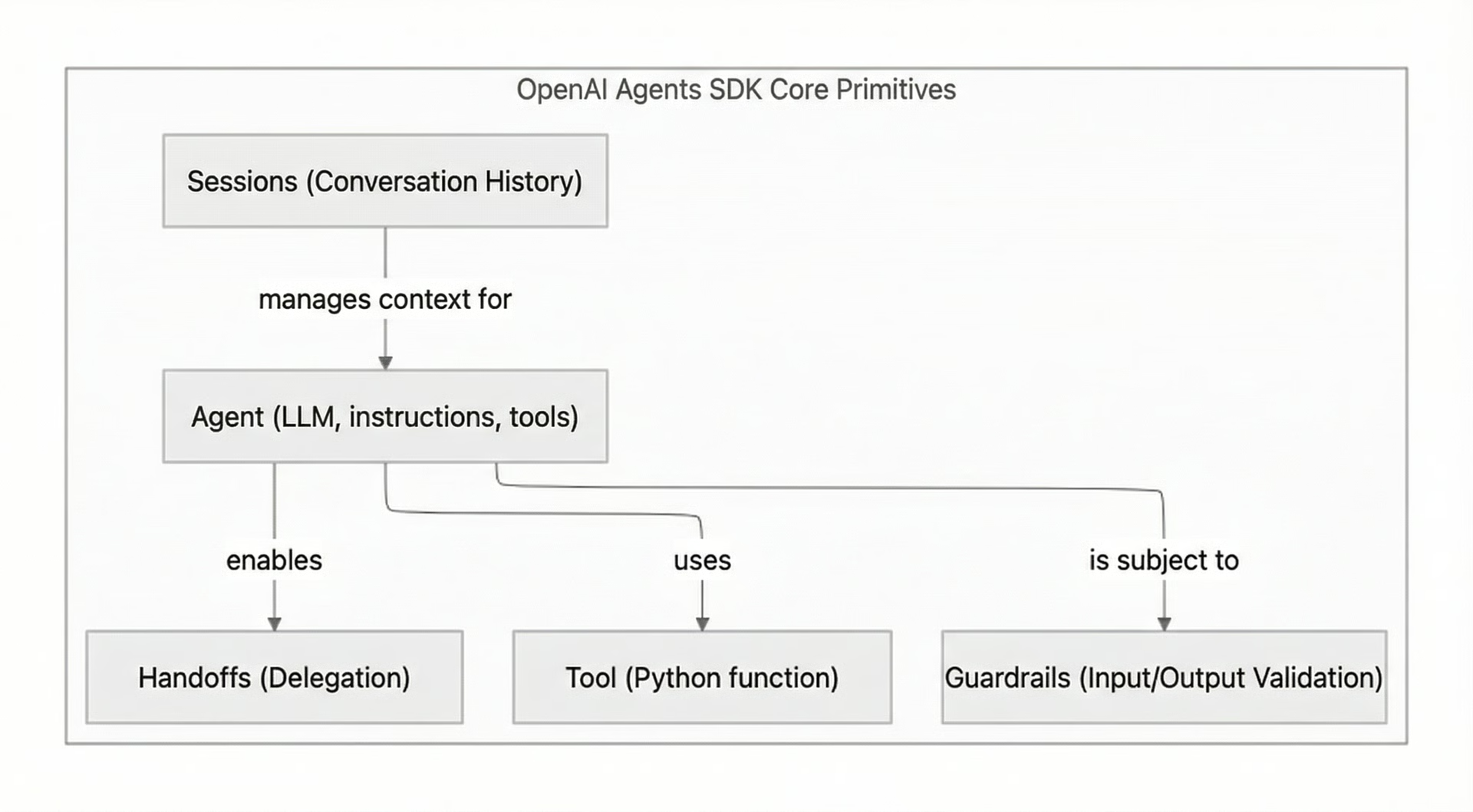 Image 6: Diagram illustrating the core primitives of the OpenAI Agents SDK and their relationships.
The fundamental difference between the OpenAI Agents SDK and LangGraph’s functional API lies in the execution model. The OpenAI SDK uses a simple, Python-native agent loop that you control directly. Orchestration is handled with standard Python code (e.g., if/else statements, for loops). In contrast, even with the decorator-based functional API, LangGraph compiles your code into an explicit, stateful graph. This underlying state machine manages execution, persistence, and interruptions, providing a more robust but also more constrained environment than the SDK’s straightforward loop.
The SDK keeps orchestration lightweight, allowing you to either let the LLM plan its actions or route logic with your own Python code. This makes it a fast path to production for teams that value a small conceptual surface and good defaults. The trade-off is that you will have to build some reliability features yourself, like durable pause and resume, that come out-of-the-box in more opinionated frameworks.
Framework Deep Dive: AgentKit
AgentKit is OpenAI’s complete toolkit for building, deploying, and optimizing agents across the API and ChatGPT ecosystem. It extends the OpenAI Agents SDK by adding visual workflow design , UI embedding , and evaluation infrastructure.
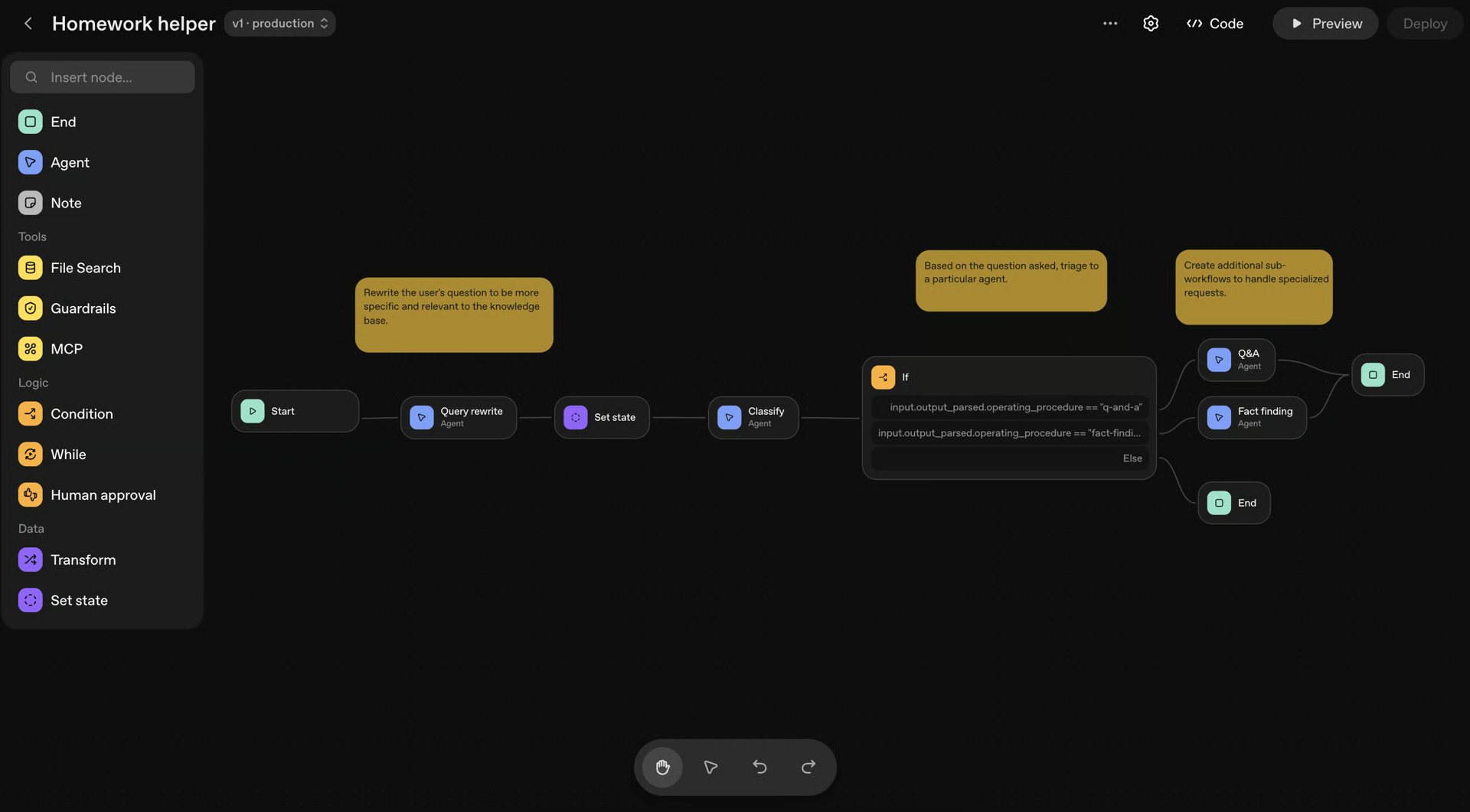 The Homework Helper workflow in AgentKit shows how agents collaborate to rewrite queries, classify intent, and route requests to specialized agents.
AgentKit introduces several core components:
- Agent Builder: A drag-and-drop canvas for designing and versioning multi-agent workflows. Builders can compose logic visually, add guardrails, and run preview tests with inline evaluation and version control.
- Connector Registry: A centralized interface for managing data connections (Dropbox, Google Drive, SharePoint, Teams, and third-party MCPs) across workspaces and organizations.
- ChatKit: A toolkit for embedding agentic chat UIs directly into web or mobile products, handling streaming responses, conversation threads, and custom theming.
- Evals and Reinforcement Fine-Tuning (RFT): Expanded capabilities for measuring, grading, and improving agent performance, including datasets, automated prompt optimization, and custom graders.
AgentKit sits one layer above the OpenAI Agents SDK: you still use the SDK for code-first orchestration, but AgentKit provides the surrounding tools for design, deployment, and continuous improvement.
The trade-off is that AgentKit is currently most optimized for OpenAI’s ecosystem and assumes use of the OpenAI stack. However, its inclusion of MCP connectors suggests growing interoperability with external tools and protocols.
Framework Deep Dive: CrewAI
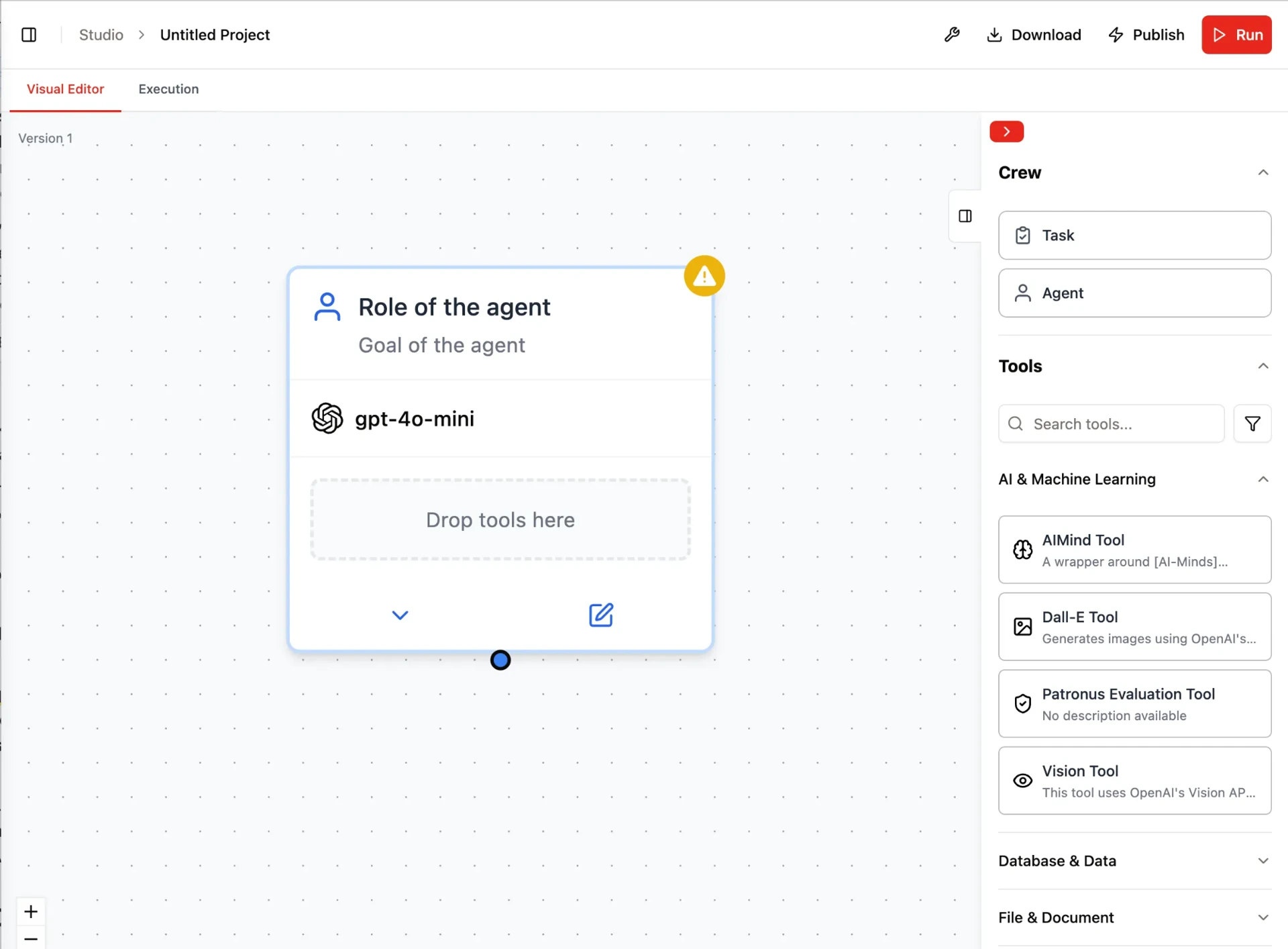 Setting up an autonomous agent in CrewAI Studio using the visual editor. Each agent is assigned a role, goal, and model here, powered by
 gpt-4o-mini
CrewAI is a framework designed for orchestrating teams of autonomous AI agents. It introduces a powerful duality with its two main concepts: Crews and Flows.
- Crews are for role-based, autonomous collaboration. You define agents with specific roles, goals, and tools, and they work together to solve a problem, much like a human team.
- Flows are for event-driven, deterministic orchestration. They give you fine-grained control over the workflow, allowing you to define precise execution paths.
This dual architecture lets you start with an autonomous crew for rapid prototyping, then introduce a flow to add structure and control as your requirements become more defined.
The developer experience is a major focus for CrewAI. It offers a command-line interface (CLI) for scaffolding projects and uses YAML files to define agents and tasks, making configuration fast and readable. It excels in multi-agent automations where role clarity is crucial, such as when a research agent hands off findings to a writer agent for drafting.
The trade-off for this speed and high-level abstraction is the configuration overhead. To build robust systems, you need to work within CrewAI’s constructs, which involves defining Crews, writing Flows, configuring memory (short-term, long-term, and entity-based), choosing a persistence mechanism, and specifying state schemas. For very simple tasks, this might feel like more setup than a minimal SDK requires.
Framework Deep Dive: PydanticAI
PydanticAI brings the developer experience of FastAPI to agent development. Its philosophy is built on type safety and data validation, using Pydantic models to define the inputs and outputs of every component. This creates a strong contract between your code and the LLM, moving many potential runtime errors to compile-time.
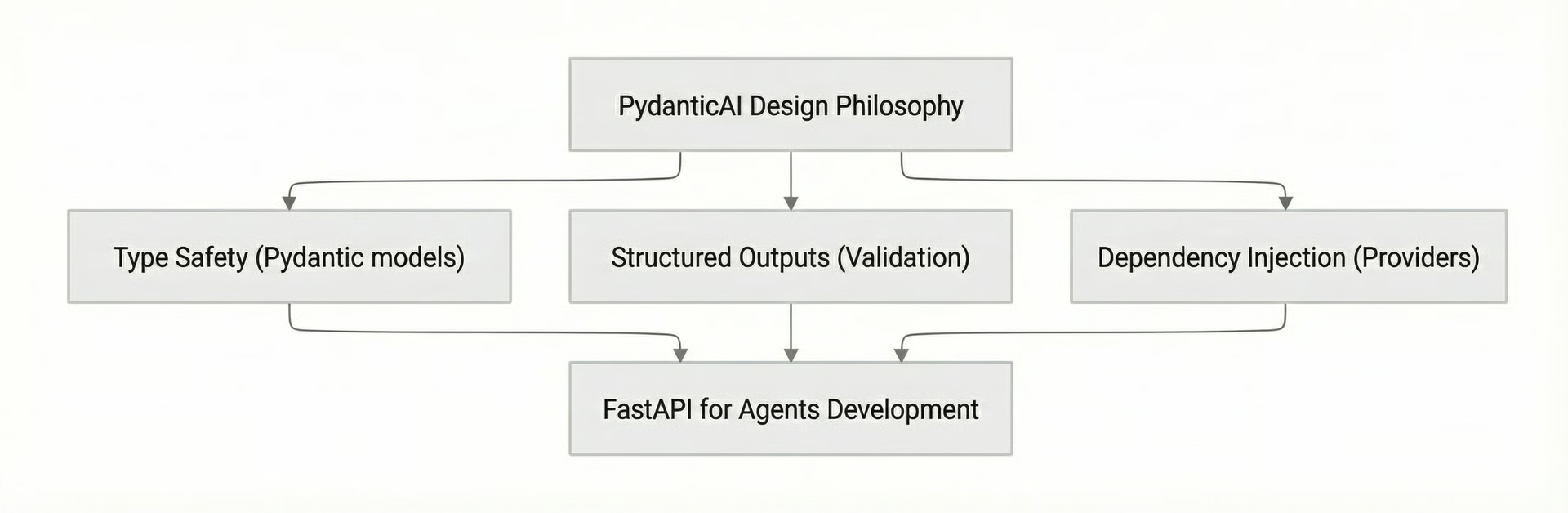 Image 8: Diagram illustrating PydanticAI's design philosophy.
The framework has two key features for production systems. First, it supports durable execution via integrations with workflow engines such as Temporal and DBOS. This allows agents to survive restarts, pause for human input, and resume long-running tasks. Second, it has built-in graph support for modeling complex, non-linear control flow.
PydanticAI’s ergonomics are excellent for developers who value explicit schemas. Type hints automatically define tool schemas, docstrings become tool descriptions, and structured outputs guide automatic retries if the LLM’s output fails validation. The trade-off is that you must define these schemas up front, which can feel like additional initial setup. Teams unfamiliar with dependency injection or durable workflows will have a short learning curve.
Framework Deep Dive: AutoGen
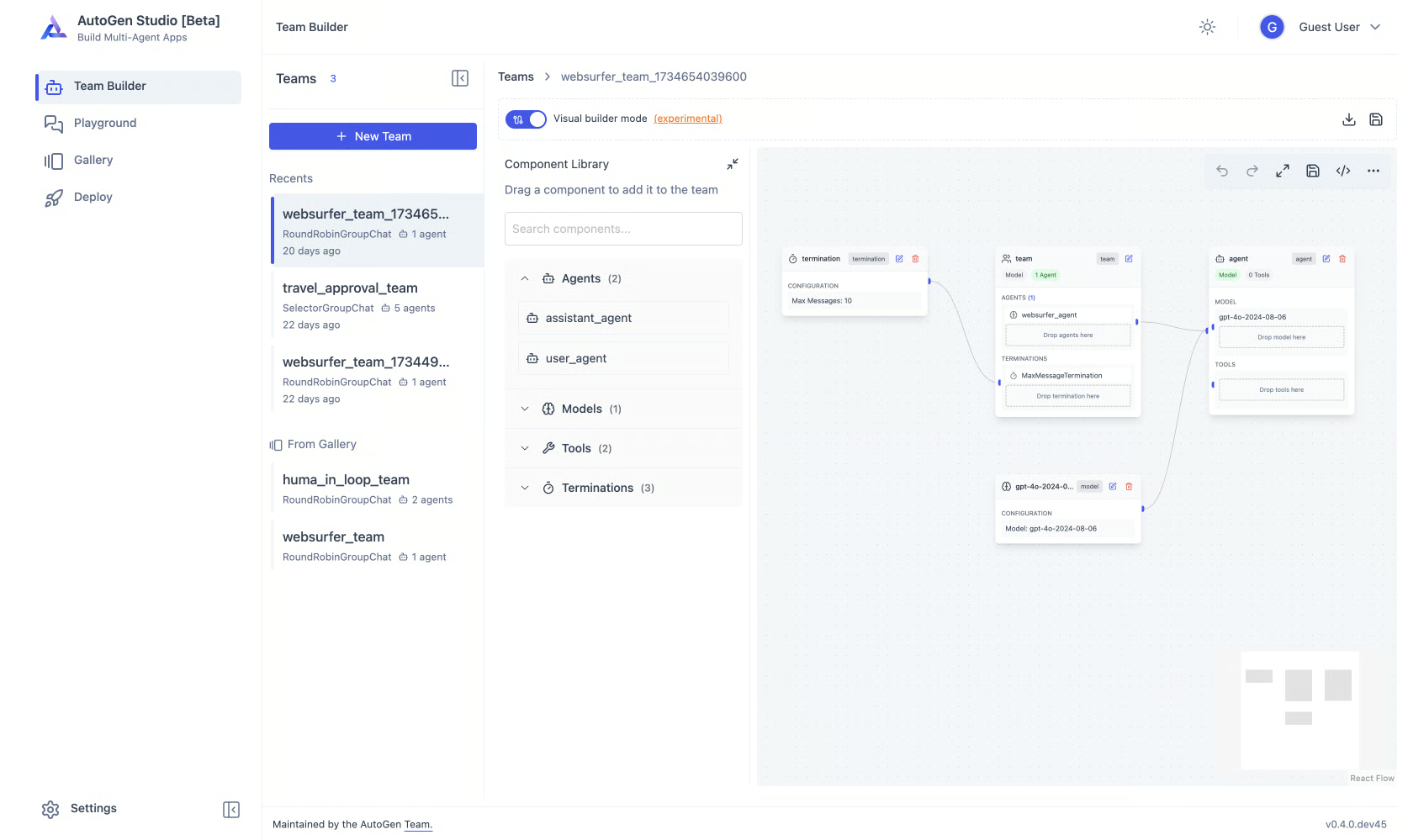 Visualizing a multi-agent workflow in AutoGen Studio. Each block represents an agent, model, or termination condition, showing how conversations and actions flow within an experimental agent team.
AutoGen, from Microsoft Research, is a powerful framework with a layered design, making it an excellent laboratory for exploring multi-agent patterns.
- AutoGen Studio is a low-code GUI that lets you prototype agent teams and workflows without writing code. You can visually compose agents, configure their tools, and test their interactions.
- AgentChat is a programming framework for building conversational multi-agent applications.
- Core provides low-level, event-driven primitives for building scalable, custom agent systems.
The typical journey with AutoGen involves using Studio to quickly explore and validate an idea, then exporting the configuration and hardening the architecture in code using AgentChat or Core. It is critical to understand that Studio is a research prototype and is not intended for production.
The trade-off with AutoGen is its focus on experimentation. While it is incredibly flexible for research and development, you will need to re-implement many production necessities like reliability, security, and observability yourself when you move to a production environment.
Framework Deep Dive: Claude Agent SDK
As a newer entrant from Anthropic, the Claude Agent SDK is designed for tight integration with the Claude family of models. While the ecosystem is still maturing compared to more established frameworks, its philosophy centers on leveraging Claude’s strengths, including large context windows, strong reasoning capabilities, and low-level tool use control.
The SDK aims to provide an ergonomic way to build agents that can reliably call tools and orchestrate complex tasks. For teams already committed to the Anthropic ecosystem, this framework offers the promise of a more optimized and native development experience. The trade-off is a smaller community and fewer third-party integrations at this stage. As with any new framework, early adoption means navigating a rapidly evolving API, but it also offers the opportunity to build applications that are finely tuned to the underlying models.
Framework Deep Dive: FastMCP
Finally, we come to the tooling layer. FastMCP is not an agent runtime; it is a framework for building servers and clients that speak the Model Context Protocol (MCP). It provides a standard way for agents to discover and use tools, regardless of the runtime on which they are built.
Image 10: FastMCP Architecture and Interoperability
You use FastMCP to build an MCP client or server that exposes your tools, resources, and prompts. This server can then be called by any MCP-compliant client, whether a LangGraph agent, an IDE plugin, or a simple script. This interoperability is its key strength. You write your tools once and can reuse them across your entire stack, drastically reducing lock-in and duplicate work.
FastMCP also provides production-grade features beyond the basic protocol, including authentication, server composition, and a cloud platform for easy deployment. For our capstone project, we adopted FastMCP to ensure our tools were portable. Our research agent is a FastMCP server, and its tools can be called from any MCP client.
Choosing for Your Project: Decision Matrix & Tentative Forecasts
To turn these principles into practical guidance, we can use a decision matrix to map common project needs to the frameworks that are a natural fit.
Table 1: Decision matrix comparing AI agent frameworks against common needs
| Need | LangGraph | PydanticAI | OpenAI SDK | AgentKit | CrewAI | AutoGen | FastMCP |
|---|---|---|---|---|---|---|---|
| Durability/HITL/Replay | ✅ | ✅ | |||||
| Typed Contracts + Durable Execution | ✅ | ✅ | |||||
| Few Primitives + Guardrails/Handoffs | ✅ | ✅ | ✅ | ✅ | |||
| Role-based Teams + Quick Scaffolding | ✅ | ✅ | ✅ | ||||
| Exploration Lab | ✅ | ✅ | ✅ | ✅ | |||
| Tool Portability Across Stacks | ✅ | ✅ | ✅ |
Please keep in mind that these libraries and frameworks are evolving rapidly, so the features from the table above may become outdated in the next months.
Based on the table above, we can make a tentative forecast. LangGraph and PydanticAI are strong candidates for production workflows where reliability, auditability, and correctness are the primary concerns. The OpenAI Agents SDK will appeal to a broad developer base that values simple agents, while AgentKit is primarily for teams that need visual workflow design, chat embedding, and evaluation infrastructure. CrewAI is well-suited for rapid multi-agent prototyping with a clear path to more structured control. FastMCP will remain the durable tooling substrate that connects these different runtimes, and AutoGen will continue to serve as the R&D lab for exploring new multi-agent patterns.
Remember to combine these axes. It is common to use FastMCP tools inside a LangGraph workflow or to start in AutoGen Studio before migrating to a more production-hardened framework. If you want an IDE-native user experience for a long-running workflow, you can keep LangGraph for orchestration but front it with FastMCP by exposing each workflow as an MCP command. This provides MCP portability for an enhanced user experience, combined with LangGraph’s durability for reliability.
Our Capstone Pivots
Let’s apply this matrix to our capstone project. Our decision-making process evolved as we built, highlighting the importance of choosing the right tool for the job.
We began by planning to use LangGraph for both the research and writing agents. However, early experiments showed that research is an interactive and divergent process. We needed to add tools, change our approach mid-run, and replan frequently. A rigid workflow was not the right fit. To maximize portability and flexibility, we moved the research workload into MCP tools and implemented our research agent, Nova, as a FastMCP server. Any MCP client can now steer it.
The writing agent, Brown, took the opposite path. The writing process was repeatable and required auditability. We required checkpoints for long drafts, HITL interrupts for editing, and the ability to replay the process for debugging. We kept Brown as a LangGraph workflow , but its tools are also served by FastMCP. In short: LangGraph for orchestration; FastMCP for tools.
To provide a seamless developer experience, we also expose Brown’s core workflows as coarse-grained MCP tools. This allows an MCP client like Cursor to trigger an entire writing or editing process with a single command, while LangGraph manages the durable, auditable execution behind the scenes. Brown currently exposes three tools: generate_article, edit_article, and edit_selected_text.
We also considered alternatives. The OpenAI Agents SDK was a solid contender for its lightweight primitives, and it remains a great option for projects that value a minimal surface area. However, we ultimately centered the capstone on LangGraph and FastMCP to leverage their first-class support for persistence, HITL, and MCP-backed portability, which are critical for our complex, long-running tasks.
Conclusion
The key lesson is to prioritize concepts over brands. The general concepts: stateful graphs, typed contracts, durable execution, and tool standardization (MCP) will allow you to adapt as frameworks rise and fall. The agent landscape will continue to evolve, but a solid understanding of these core principles will enable you to make informed decisions. The MCP specification is short and worth skimming; understanding it once pays dividends across every agent stack.
Prototype, measure, and iterate. Begin by selecting the decision axes, then choose the smallest stack that meets your current needs, and finally keep your tooling interface portable with MCP to avoid lock-in. It is common to start a pattern in AutoGen Studio for speed, migrate your tools to FastMCP for portability, and anchor your long-running flows in LangGraph or PydanticAI as your requirements solidify.
In the next lesson (14), you’ll formalize the system‑design decision framework —how to choose models, balance cost/latency, and place human‑in‑the‑loop gates. Later in Part 2 (Lessons 16–24), you’ll build both agents end‑to‑end: Nova with FastMCP (server/client, ingestion, Perplexity loops, filtering, research.md) and Brown with LangGraph + FastMCP (workflow + MCP tools, profiles via context engineering, reflection/self‑critique, HITL editing).
References
- LangChain. (n.d.). Workflows and agents. LangChain Documentation. docs.langchain.com/oss/python/langgraph/workflows-agents
- LangChain. (n.d.). Persistence. LangChain Documentation. docs.langchain.com/oss/python/langgraph/persistence
- OpenAI. (n.d.). OpenAI Agents SDK. OpenAI. openai.github.io/openai-agents-python
- CrewAI. (n.d.). Introduction. CrewAI Documentation. docs.crewai.com/introduction
- CrewAI. (n.d.). Quickstart. CrewAI Documentation. docs.crewai.com/quickstart
- CrewAI. (n.d.). Build your first Flow. CrewAI Documentation. docs.crewai.com/guides/flows/first-flow
- Pydantic. (n.d.). Pydantic AI. Pydantic. ai.pydantic.dev
- Pydantic. (n.d.). Durable Execution. Pydantic AI Documentation. ai.pydantic.dev/durable_execution/overview
- Microsoft. (n.d.). AutoGen. Microsoft. microsoft.github.io/autogen/stable
- Microsoft. (n.d.). AutoGen Studio User Guide. AutoGen Documentation. microsoft.github.io/autogen/stable/user-guide/autogenstudio-user...
- Prefect Technologies, Inc. (n.d.). FastMCP. FastMCP. gofastmcp.com
- Prefect Technologies, Inc. (n.d.). Quickstart. FastMCP Documentation. gofastmcp.com/getting-started/quickstart