Lesson 4: Structured Outputs
In our previous lessons, we laid the groundwork for AI Engineering. We explored the AI agent landscape, looked at the difference between rule-based LLM workflows and autonomous AI agents, and covered context engineering: the art of feeding the right information to an LLM. In this lesson, we will tackle a fundamental challenge: getting structured and reliable information out of an LLM.
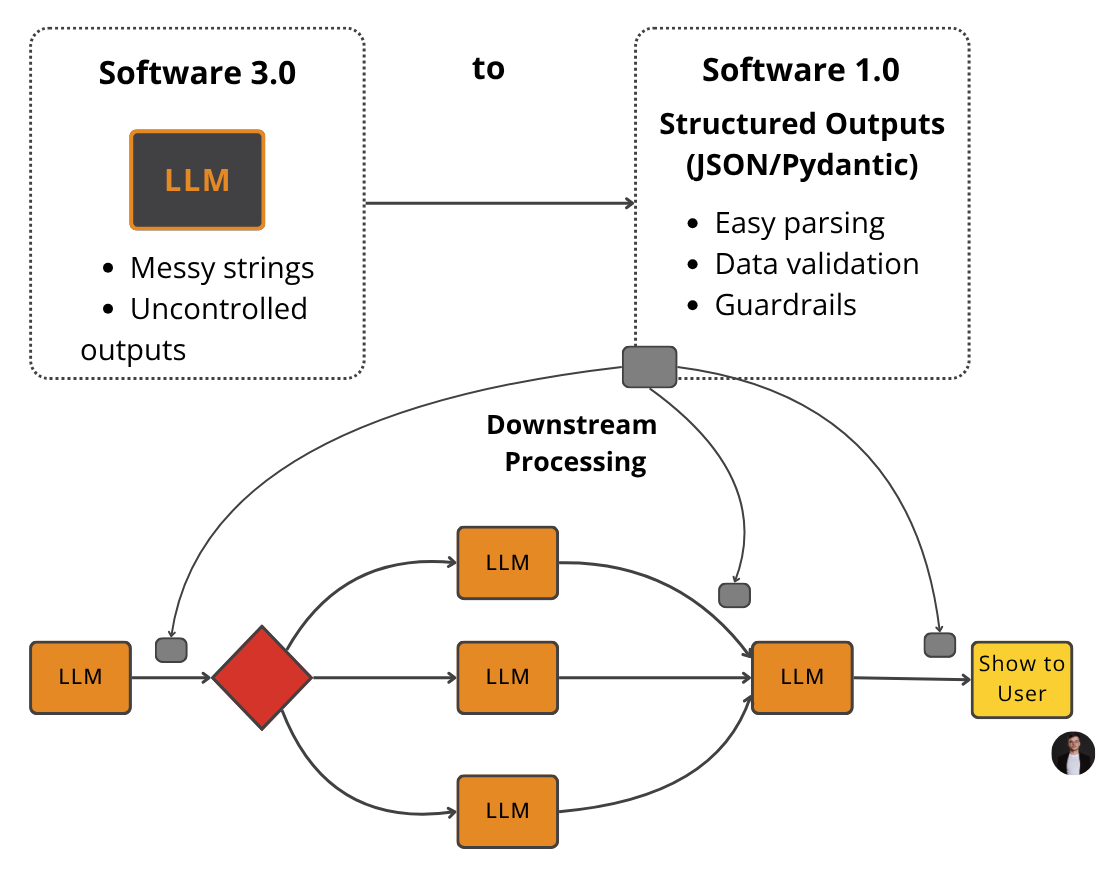 Figure 1: The goal of structured outputs is to fill in the gap between Software 3.0 (LLM workflows & AI Agents) and Software 1.0 (Traditional Applications). Side note: Software 2.0 is referred to as the Machine Learning/Deep Learning world.
LLMs operate in a world of unstructured data and probabilities, where we input instructions in plain English and get results as plain text. This subdomain of engineering is often called "Software 3.0". Our application, however, relies on deterministic code and predictable data structures, which is known as "Software 1.0". Structured outputs are the bridge between these two worlds, a fundamental technique for forcing LLMs to return consistent, machine-readable data. Mastering this is essential for any AI engineer building production-grade systems.
Why Structured Outputs Are Critical
Before we start coding, it is crucial to understand why structured outputs are foundational to building reliable AI applications. When an LLM returns a free-form string, you face the messy task of parsing it. This often involves fragile regular expressions or string-splitting logic. These methods easily break if the model changes its phrasing even slightly [1], [2]. Structured outputs solve this by forcing the model’s response into a predictable format like JSON.
This approach offers several key benefits.
First, structured outputs are easy to parse, manipulate, and debug. Instead of wrestling with raw text, you work with clean Python objects like dictionaries or, even better, Pydantic models. This allows you to programmatically access the data you need without guesswork, making your code cleaner and more predictable.
Second, using libraries like Pydantic adds a layer of data and type validation [3], [4]. If the LLM returns a string where an integer is expected, your application will not crash silently with a TypeError or KeyError down the line. Instead, it will raise a clear validation error immediately. This "fail-fast" behavior is essential for building reliable systems and preventing bad data from propagating through your application.
Structured outputs create a formal contract between the LLM and your application code, making it easier to pass data around the system. Engineers use this pattern everywhere. As seen in Figure 1, we leverage structured outputs to pass the right subset of information to the next LLM step or other downstream systems like databases, user interfaces, or APIs. For example, a popular use case is to extract properties like names, tags, and dates to build knowledge graphs for advanced RAG or natural language filters to filter records from the database [5], [6], [7].
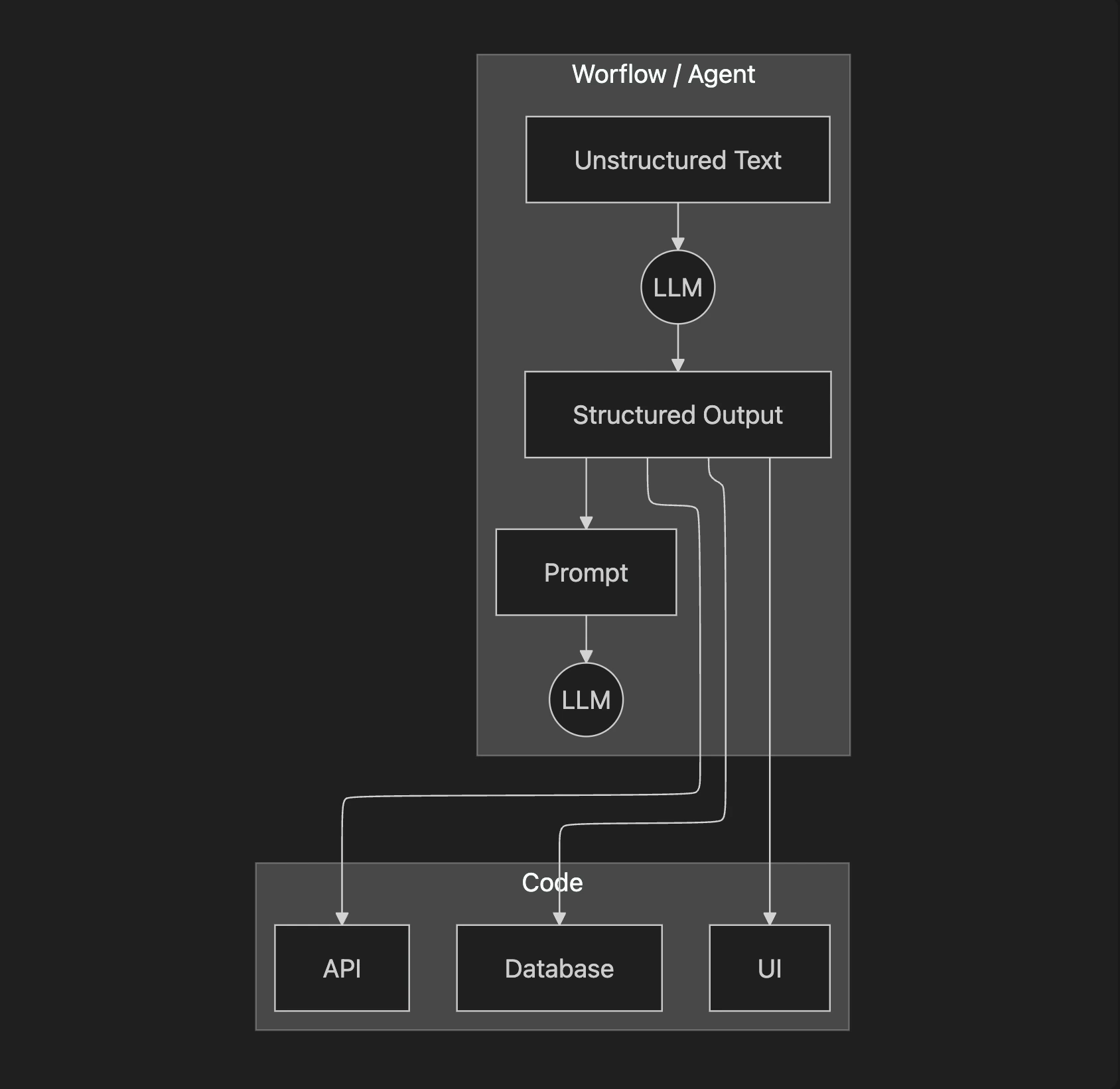 Figure 2: A simplified flow showing how structured outputs bridge the gap between LLMs and downstream components.
To understand how structured outputs work in practice, we will explore three ways to implement them: from scratch with JSON, from scratch with Pydantic, and natively with the Gemini API.
Implementing Structured Outputs From Scratch Using JSON
We will first implement structured outputs from scratch, guiding an LLM to generate structured outputs. This will help you build an intuition of what modern LLM APIs offer.
- Now, we craft a prompt that instructs the LLM to extract metadata and format it as JSON. Notice how we provide a clear example of the desired structure and use XML tags like
andto separate the input data from the formatting instructions. This is a common and effective prompt engineering technique to improve clarity and guide the model's output [8], [9]. The key to good prompt engineering is providing a clear example of how the output should look:
- We send the prompt to the model and inspect the raw response. As expected, the model returns a JSON object, but it is often wrapped in Markdown code blocks:
It outputs:
- Finally, we parse the string into a Python dictionary, which can now be used in your application:
It outputs:
This "from scratch" method works, but it relies on manual parsing and lacks data validation. If the LLM makes a mistake, such as outputting an int or null instead of a string, our application will fail. Next, we will see how Pydantic solves this problem.
Implementing Structured Outputs From Scratch Using Pydantic
While forcing JSON output is an improvement over parsing raw text, it still leaves you with a plain Python dictionary. You cannot be sure what is inside that dictionary, if the keys are correct, or if the values have the right type. This uncertainty can lead to bugs and make your code difficult to maintain. This is where Pydantic helps. Pydantic is a data validation library that enforces structure and type hints at runtime, ensuring data integrity from the moment data enters your application [3]. It provides a single, clear source of truth for your data structure and can automatically generate a JSON Schema from your Python class.
When an LLM produces output that does not match the structure and types defined in your Pydantic model, the library raises a ValidationError. This error clearly explains what went wrong, allowing you to quickly identify and fix issues. This "fail-fast" behavior is essential for building reliable systems, preventing bad data from moving through your application and causing hard-to-debug errors later.
Let's refactor our previous example to use Pydantic.
- We define our desired data structure as a Pydantic class. This class acts as a single source of truth for your output format. We use standard Python type hints to define the expected type for each field. Pydantic works with Python's
typingmodule. Since Python 3.10, you can use built-in types likelistdirectly, and Python 3.10+ introduces the cleaner union syntax with|for optional types (e.g.,str | Noneinstead ofOptional[str]). We recommend using Python 3.11+ for best performance and modern syntax.
You can also nest Pydantic models to represent more complex, hierarchical data. This allows you to define intricate relationships between different pieces of information, such as a DocumentMetadata model containing a Summary object and a list of Tag objects. Nesting helps organize your data logically and reflects the real-world complexity of information. However, it is a good practice to keep schemas from becoming overly complex, as it can confuse the LLM and lead to errors.
- With our Pydantic model defined, we can automatically generate a JSON Schema from it. A schema is the standard term for defining the structure and constraints of your data. Think of it as a formal contract between your application and the LLM. This contract precisely dictates the expected fields, their types, and any validation rules. We provide this generated schema to the LLM to guide its output, giving the model a clear blueprint for its response. This is similar to the technique used internally by APIs like Gemini and OpenAI to enforce a specific output format, ensuring their models adhere to predefined structures [10]. More on this in the next section.
The generated schema looks like this. Notice how the description defined in the Field type descriptor is present in the schema passed to the LLM to guide the structured output generation process. This makes Pydantic the perfect tool for defining your schemas:
- Now we call the model and extract the JSON string, as in the previous example:
It outputs:
- Ultimately, we validate and parse it directly into our
DocumentMetadataobject:
It outputs:
The document_metadata Pydantic objects can now be safely used throughout your application, with full type-hinting and attribute access. This is the main advantage: you move away from unclear dictionaries, where you constantly check for missing keys or incorrect types, to clean, predictable Python objects.
- For example, if for the tags attribute we had a simple string instead of a list of strings (as defined in the Pydantic model), such as:
The example, from above, would output:
Python’s built-in dataclasses or TypedDict can define structure, but they only provide type hints for static analysis tools [3], [4], [11]. They do not perform runtime validation. This means if the LLM returns a string where an integer is expected, or if a required field is missing, a dataclass or TypedDict will not catch this error immediately. A type mismatch will go unnoticed until it causes an error during execution, potentially leading to difficult-to-debug issues later. While TypedDict can be faster for simple cases without validation, Pydantic's overhead is minimal for the robust data integrity it provides [13].
Overall, Pydantic’s runtime validation, type constraints, and clear schema definitions make it a strong option for structuring and validating data in LLM workflows and AI agent systems. Its features are well-suited for building reliable, production-ready applications.
While Pydantic brings structure and validation to LLM outputs, in this example, we still had to construct prompts and handle responses manually. Let’s see how we can configure modern LLM APIs like Gemini to natively output Pydantic structured outputs.
Implementing Structured Outputs Using Gemini and Pydantic
When working with modern APIs such as Gemini and OpenAI, the recommended way to generate structured outputs in JSON or Pydantic format is by leveraging their native features. As the prompt engineering is done directly by the vendor, it ensures that the most suitable method is used for their models. After all, they know best what the model was trained on.
Thus, using their native configuration is simpler, more accurate, and often more cost-effective than manual prompt engineering. Allowing you to focus on your application's logic instead of data wrangling [10], [14], [15], [16].
Let’s see how to achieve the same result using the Gemini API's native capabilities. The process becomes much simpler.
- We define a
GenerateContentConfigobject, instructing the Gemini API to set theresponse_mime_typeto"application/json"and theresponse_schemato ourDocumentMetadataPydantic model. This replicates the behaviour from the previous sections, as it configures the model to output JSON structures and converts them to the given Pydantic model:
- This configuration makes our prompt significantly shorter and cleaner, eliminating the need to manually inject JSON examples or full schemas. We simply ask the model to perform the task, as the instruction comes directly from the config:
- Now, we call the model, passing our simplified prompt and the new configuration object.
- The Gemini client automatically parses the output for us. By accessing the
response.parsedattribute, we receive a ready-to-use instance of ourDocumentMetadataPydantic model. This eliminates the need for custom parsing functions or manual validation steps.
It outputs:
This native approach is the recommended way to generate structured outputs. It is robust, efficient, and requires less code, allowing you to focus on your application's logic instead of data wrangling.
Structured Outputs Are Everywhere
We have covered the why and how of structured outputs, from manual prompting to native API integration. This technique is a fundamental pattern in AI engineering. It is the essential bridge connecting the probabilistic, free-form nature of LLMs with the deterministic, structured world of software applications. Whether you are building a simple workflow to summarize articles or a complex agent that analyzes financial data, you will use structured outputs. This ensures reliability and control.
This pattern will be a recurring theme throughout this course. In our next lesson, we will explore the basic ingredients of LLM workflows, where we will see how structured data flows between different components. Later, when we build agents that can take action or reason about the world, structured outputs will be how they parse information and decide what to do next. Mastering this technique is a key step toward building powerful and predictable AI systems.
References
- [1] Systematic evaluation of large language models for data extraction from unstructured and semi-structured electronic health records
- [2] Direct vs. Indirect Information Extraction using LLM-based Function Generation
- [3] Pydantic vs. Dataclasses: A Clear Winner for SDKs
- [4] Pydantic vs. Dataclasses: a battle of validators in Python
- [5] Automating Knowledge Graphs with LLM Outputs
- [6] Structured Outputs
- [7] Structured Outputs in vLLM: Guiding AI Responses with Precision
- [8] Best practices for prompt engineering with the OpenAI API
- [9] Structured data response with Amazon Bedrock: Prompt engineering and tool use
- [10] Structured output
- [11] TypedDict vs. dataclasses in Python: an epic typing battle
- [12] OpenAI Function Calling & Structured Prompting with Pydantic
- [13] Performance
- [14] When should I use Function Calling, Structured Outputs or JSON Mode?
- [15] Structured Output in vertexAI BatchPredictionJob
- [16] Hacker News Discussion on Structured Output
- [17] Gemini API Structured Output
- [18] Structured Outputs with Pydantic & OpenAI Function Calling
- [19] Structured Outputs with OpenAI
- [20] Steering Large Language Models with Pydantic
- [21] How to return structured data from a model
- [22] YAML vs. JSON: Which Is More Efficient for Language Models?