Lesson 5: LLM Workflow Patterns
A common trap in AI engineering is treating Large Language Models (LLMs) as magical black boxes. The thinking goes: if you just craft a sufficiently complex, elaborate prompt, the LLM can solve any multi-step problem in one shot. This approach is a recipe for building brittle, unreliable systems that are impossible to debug and unfit for production. When the model inevitably fails, you have no idea which of the 20 instructions in your mega-prompt was the weak link.
This is not real engineering.
The truth is, building robust and reliable LLM applications requires modularity. Instead of one giant, monolithic prompt, we should break down complex problems into smaller, manageable steps. This lesson is about the fundamental patterns that enable this modular approach: chaining, parallelization, routing, and orchestrating. These are the essential building blocks for moving from simple prompts to sophisticated, production-grade workflows. We will explore how to implement these patterns to build powerful, predictable, and maintainable AI systems.
The Challenge with Complex Single LLM Calls
Attempting to solve a complex, multi-step task with a single, large LLM call is an anti-pattern.
While it might seem efficient, it introduces a host of engineering problems that make the system fragile and difficult to maintain. The core issue is a lack of control and observability. When you bundle numerous instructions into one prompt, you lose the ability to isolate and debug failures. If the final output is wrong, you have no way of knowing if the model misunderstood an early instruction or simply ignored a crucial part of your request. This leads to inconsistent and unpredictable outputs, undermining reliability for structured tasks, as unconstrained prompting can lead to output label inconsistency and schema drift [1].
This approach also suffers from the "lost in the middle" problem, where models tend to pay less attention to information located in the middle of a long context window [2]. The model might perform well on the first and last instructions but forget or misinterpret the ones in between, especially in long narratives with many events [2]. Furthermore, single prompts can be highly sensitive to minor input changes, where small phrasing differences can cause dramatically different outputs, harming reproducibility [3]. Stuffing too many instructions into a single prompt can also lead to overstuffed context windows, potentially truncating inputs and causing incomplete outputs [3].
Let's make this concrete with an example. Suppose we want to generate a Frequently Asked Questions (FAQ) page from a few documents about renewable energy. A naive approach would be to stuff all the content and instructions into a single prompt.
Next, we define our source content, which consists of three mock web pages about renewable energy. We combine their titles and content into a single string for the LLM to process.
Now, we create a single, complex prompt that asks the LLM to generate 10 FAQs, provide answers, and cite the sources, all at once. We use Pydantic models to enforce a structured JSON output, a concept we covered in a previous lesson on structured outputs.
Here is a sample of the output:
At first glance, the output might seem acceptable. However, with complex instructions, subtle inaccuracies creep in. In the example above, the answer is derived from both "Energy Storage Solutions" and "Understanding Wind Turbines," but the model only cited one source. The more complex the task, the more such errors will occur. This single-prompt approach is fundamentally brittle and not suitable for building systems that require high accuracy and reliability.
The Power of Modularity: Why Chain LLM Calls?
The solution to the fragility of single, complex prompts is prompt chaining. This is a simple yet powerful "divide-and-conquer" strategy for LLM workflows. Instead of asking the model to do everything at once, we break down the task into a sequence of smaller, more focused sub-tasks. The output of one LLM call then becomes the input for the next, creating a chain of operations that guides the model toward the final, desired result [4].
This modular approach brings significant engineering benefits. First, it generally improves accuracy and reliability. A simple, targeted prompt is much easier for an LLM to understand and execute correctly than a long, convoluted one. Each step in the chain has a single, clear objective, which minimizes the chances of misinterpretation or hallucination [5]. By segmenting the interaction into distinct steps, each prompt becomes a module with explicit inputs and outputs, supporting structured workflows and clearer boundaries between tasks [4].
Second, modularity makes the system far easier to debug and maintain. When a workflow is broken into discrete steps, you can inspect the input and output of each one. If a failure occurs, you can quickly pinpoint the exact step in the chain that caused the problem, rather than trying to decipher a single, failed mega-prompt [6]. This step-by-step output increases explainability and makes it easier to trace how conclusions are reached, which is important for building and operating production systems [7].
Finally, chaining offers flexibility. You can optimize each step independently. For instance, you could use a fast, cheaper model like Claude Haiku for a simple classification task and a more powerful, expensive model like Claude Opus for a complex reasoning step. This allows you to balance cost, latency, and quality across the workflow [5].
However, this approach is not without trade-offs. Chaining multiple LLM calls will inevitably increase latency and cost compared to a single call [8], [9]. Each additional call adds to the total processing time and token count, which can lead to significantly higher API bills, especially as the number of steps or the volume of requests increases [10]. There is also a risk of information loss between steps; if an intermediate step produces a poor-quality summary, that error will cascade down the chain and impact the final output. Critically, some instructions lose their intended meaning when separated—a task that is clear in a single prompt can become ambiguous when broken apart, leading to subtle but significant errors in the final result. Furthermore, managing multiple interconnected prompts adds design and maintenance burden, often requiring additional "glue code" to connect the different pieces, which increases engineering complexity [9], [10], [11]. As engineers, we must weigh these trade-offs and design our workflows to be as efficient and robust as possible.
Building a Sequential Workflow: FAQ Generation Pipeline
Let's put the theory of prompt chaining into practice by refactoring our FAQ generation example. Instead of relying on one big, monolithic prompt, we will build a 3-step sequential pipeline. This approach breaks down the complex task into smaller, more manageable units, making the entire process more robust and transparent.
Here are the three distinct steps in our sequential pipeline:
- Generate Questions : The initial step involves an LLM call to read the source content and generate a list of relevant questions. This focuses the LLM solely on question formulation.
- Answer Questions : For each generated question, a second LLM call will produce a concise answer based on the provided source content. This step ensures answers are directly grounded in the given text.
- Find Sources : For each question-and-answer pair, a third LLM call will identify the original source titles used. This crucial step adds traceability and verifiability to our generated FAQs.
This modular approach ensures that each step has a single responsibility, leading to more consistent and traceable results. By isolating concerns, we can better control the output of each stage and pinpoint issues if they arise.
First, we create a function to generate the initial list of questions. This function takes the combined content and the desired number of questions as input. Its sole purpose is to extract potential questions from the provided text. We use a Pydantic model, QuestionList, to ensure the output is a structured list of strings, a concept we explored in Lesson 4 on structured outputs. This structured output is vital for the next steps in our chain.
Next, we define a function to answer a given question. This prompt is tightly focused: it instructs the model to use only the provided content to formulate a concise answer. This strict constraint is essential for preventing the LLM from hallucinating information, ensuring that the source material directly supports every answer.
Finally, we create a function to find the sources for a given question-and-answer pair. This step adds the traceability that was missing from our single-prompt approach. By dedicating a specific step to source identification, we can ensure that each answer is accurately attributed, which is critical for building trustworthy AI applications. This function also uses a Pydantic model, SourceList, to return a structured list of source titles.
Now, we can combine these functions into a sequential workflow.
The sequential_workflow function orchestrates the entire process, calling each of the three steps in order for every question. This structured execution ensures that the data flows logically from one specialized task to the next.
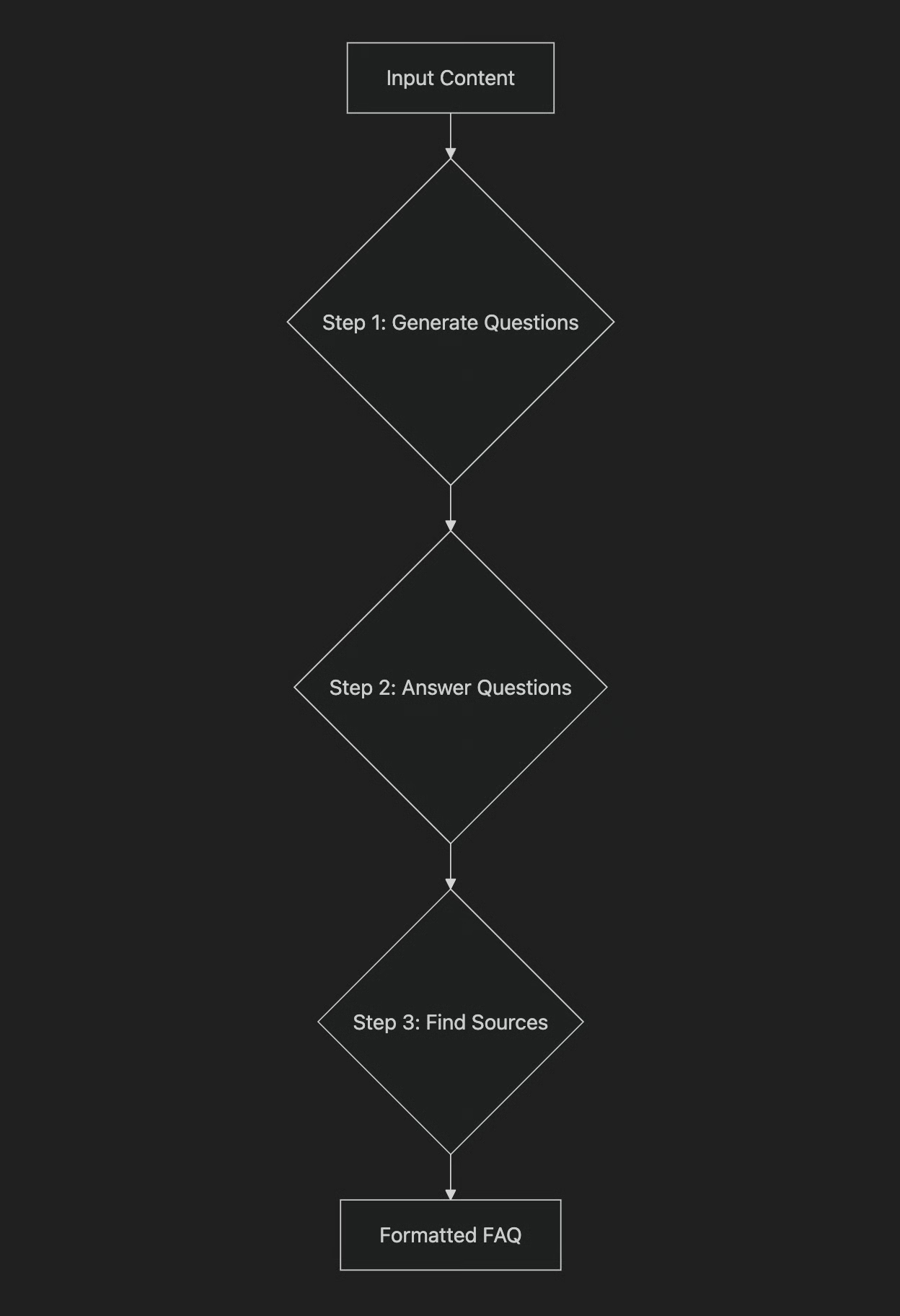 Figure 1: A diagram illustrating the sequential FAQ generation pipeline.
Running this code produces the following output:
And here's one of the resulting FAQ objects, demonstrating the improved accuracy:
Notice the difference. By breaking the problem down, our find_sources step correctly identified both "Understanding Wind Turbines" and "Energy Storage Solutions" as sources for the answer. The output is more accurate and, because we can inspect the result of each step, the entire process is more transparent and debuggable. The trade-off is execution time; it took over 20 seconds to process just four questions. This sets the stage for our next topic: optimization.
Optimizing Sequential Workflows With Parallel Processing
The sequential workflow we built is robust, but it's slow. Each LLM call is blocking, meaning the workflow must wait for one step to complete before the next one can begin. For our FAQ example, processing just four questions results in nine separate, sequential API calls. One to generate the questions, and then two for each question (answer and sources). This cumulative latency can become a major bottleneck.
- Next, we create a new asynchronous function,
process_question_parallel, which handles a single question by calling both theanswer_question_asyncandfind_sources_asyncfunctions.
- Finally, we create the
parallel_workflow. This function first generates the list of questions synchronously. Then, it usesasyncio.gatherto execute theprocess_question_parallelfunction for all questions concurrently.
When we run this parallel workflow, the output shows a significant improvement in performance:
By running the independent tasks in parallel, we cut the execution time by more than half. This demonstrates how parallel processing can dramatically reduce latency for tasks where sub-components are independent. However, this optimization comes with its own set of trade-offs. While sequential processing is easier to debug, parallel processing introduces more complexity in managing state and handling errors.
⚠️
A critical real-world consideration when implementing parallel LLM calls is API rate limiting. LLM providers enforce quotas, typically measured in requests-per-minute (RPM) or tokens-per-minute (TPM). Making many parallel calls can easily exceed these limits, leading to 429 errors, which indicate "Too Many Requests" [12], [13]. Production systems must implement robust error-handling strategies to manage this. This includes using exponential backoff with jitter, where your system retries failed requests after increasing delays, and respecting any Retry-After headers provided by the API [12], [14]. Additionally, implementing client-side queueing or dynamically adjusting concurrency based on real-time rate limit headers can help manage throughput and stay within API limits [12], [13], [15].
Introducing Dynamic Behavior: Routing and Conditional Logic
So far, our workflows have followed a fixed, linear path. While this works for straightforward tasks, real-world applications often need to adapt dynamically based on user input. A customer service bot, for example, cannot use the same script for a billing question as it would for a technical support issue. Each query type demands a distinct approach.
This is where routing comes in. Routing introduces conditional logic into your workflows, allowing them to adapt intelligently. Instead of following a single, fixed path, your workflow can branch dynamically based on the input's characteristics.
The core idea is to use an LLM call as a classification step. This LLM acts as a dispatcher, interpreting the input's intent and determining which specific branch of the workflow to execute [16]. This enables the system to triage requests and direct them to the most appropriate specialized handler. This approach aligns perfectly with the "divide-and-conquer" principle. By routing different input types to specialized handlers, you keep each prompt simple and focused, adhering to the principle of single responsibility. This separation of concerns is crucial, as trying to optimize a single prompt for multiple input types can degrade performance on others [17], [18]. This modularity makes the overall system more robust, maintainable, and easier to optimize [19].
Next, we create the classify_intent function. This function uses an LLM to categorize the user's query into one of our predefined intents. The prompt guides the LLM to select from the specified categories, ensuring a focused classification.
When designing the prompt for intent classification, it's best practice to define a clear, precise, and comprehensive taxonomy of intents to guide the LLM's classification process [20]. Providing high-quality, representative examples for each intent is also critical for accuracy, especially for edge cases [21], [22]. Some systems even use a two-stage architecture where an initial model retrieves top candidate intents, and then an LLM selects the best match from that narrowed set to improve precision [23].
Now, we define specialized prompts for each intent. Each prompt provides a specific persona and instructions for the LLM to follow. This ensures the response is tailored to the classified intent.
Finally, we create the handle_query function, which acts as our router. It takes the user's query and the classified intent, then selects the appropriate prompt to generate a response. This conditional logic allows the workflow to dynamically adapt.
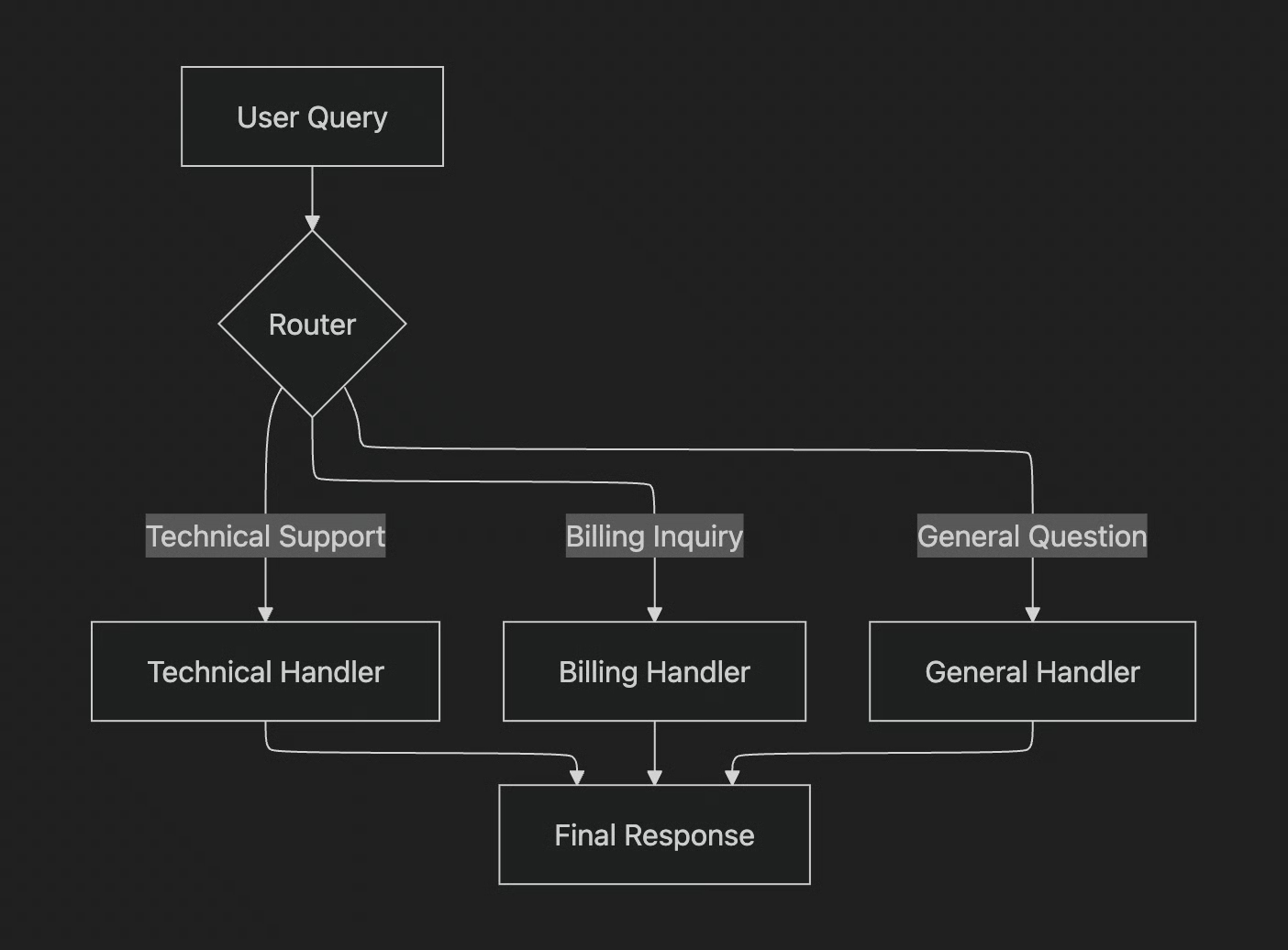 Figure 2: A diagram illustrating the routing workflow with conditional branching.
Let's test it with a few different queries:
For the first query, the output is:
- Intent:
TECHNICAL_SUPPORT - Response:
Hello there! I'm sorry to hear you're having trouble with your internet connection... could you please provide a few more details? ... Have you already tried any troubleshooting steps yourself?
For the second query, the output is:
- Intent:
BILLING_INQUIRY - Response:
I'm sorry to hear you think there might be a mistake on your last invoice. I can definitely help you look into that! To access your account and investigate the charges, could you please provide your account number?
The workflow correctly classified each query and routed it to the specialized handler, resulting in a perfectly tailored response for each case. This is the power of routing: creating structured, predictable, and specialized logic within your AI applications.
Orchestrator-Worker Pattern: Dynamic Task Decomposition
We have seen how to build linear and branching workflows. But what happens when a task is so complex that the necessary steps cannot be predicted in advance?
The orchestrator-worker pattern offers a flexible approach for this problem. In this pattern, a central "orchestrator" LLM analyzes a complex query, dynamically breaks it down into smaller sub-tasks, and delegates them to specialized "worker" LLMs. The orchestrator then combines the results from these workers into a single, cohesive response [25].
This pattern's core strength lies in its dynamic nature. Unlike a predefined parallel workflow where sub-tasks are fixed, the orchestrator determines them on the fly based on the specific input. This allows it to adapt the number, type, and sequencing of subtasks at runtime, making it ideal for complex scenarios like a customer support ticket that touches on multiple issues—billing, returns, and order status—all at once [25], [26].
While powerful, this pattern introduces its own implementation challenges. The central orchestrator can become a bottleneck if its planning and monitoring responsibilities are serialized [27], [28]. You also face the risk of incomplete decomposition, where the orchestrator might miss necessary subtasks or conflicting worker outputs that are difficult to reconcile during synthesis [28]. Ensuring clear boundaries and consistent prompt schemas between the orchestrator and workers is crucial to avoid misrouted subtasks and synthesis errors [29]. The synthesizer's role in combining outputs is critical, but it faces challenges in resolving conflicts between specialized outputs and normalizing formats to ensure the final product is cohesive [30], [31].
Let's build an example. Our orchestrator will take a complex customer query and break it down into a list of structured tasks.
- Define the data structures for tasks : We start by defining the
QueryTypeEnumto categorize different types of queries, along withTaskandTaskListPydantic models. This structures the orchestrator's output.
- Implement the orchestrator function : This function takes a complex user query and crafts a prompt to guide the LLM in breaking it down into structured sub-tasks.
Next, we define specialized worker functions for each task type. For example, the handle_billing_worker simulates opening an investigation, the handle_return_worker generates a Return Merchandise Authorization (RMA) number, and the handle_status_worker fetches order details.
After the workers complete their tasks, a final synthesizer LLM combines their structured outputs into a single, user-friendly message. This step is crucial for presenting a cohesive response to the user. Its prompt takes the structured outputs from all the workers and asks the model to combine them into a single, friendly, and well-formatted email to the customer.
Here’s a diagram of the full orchestrator-worker workflow.
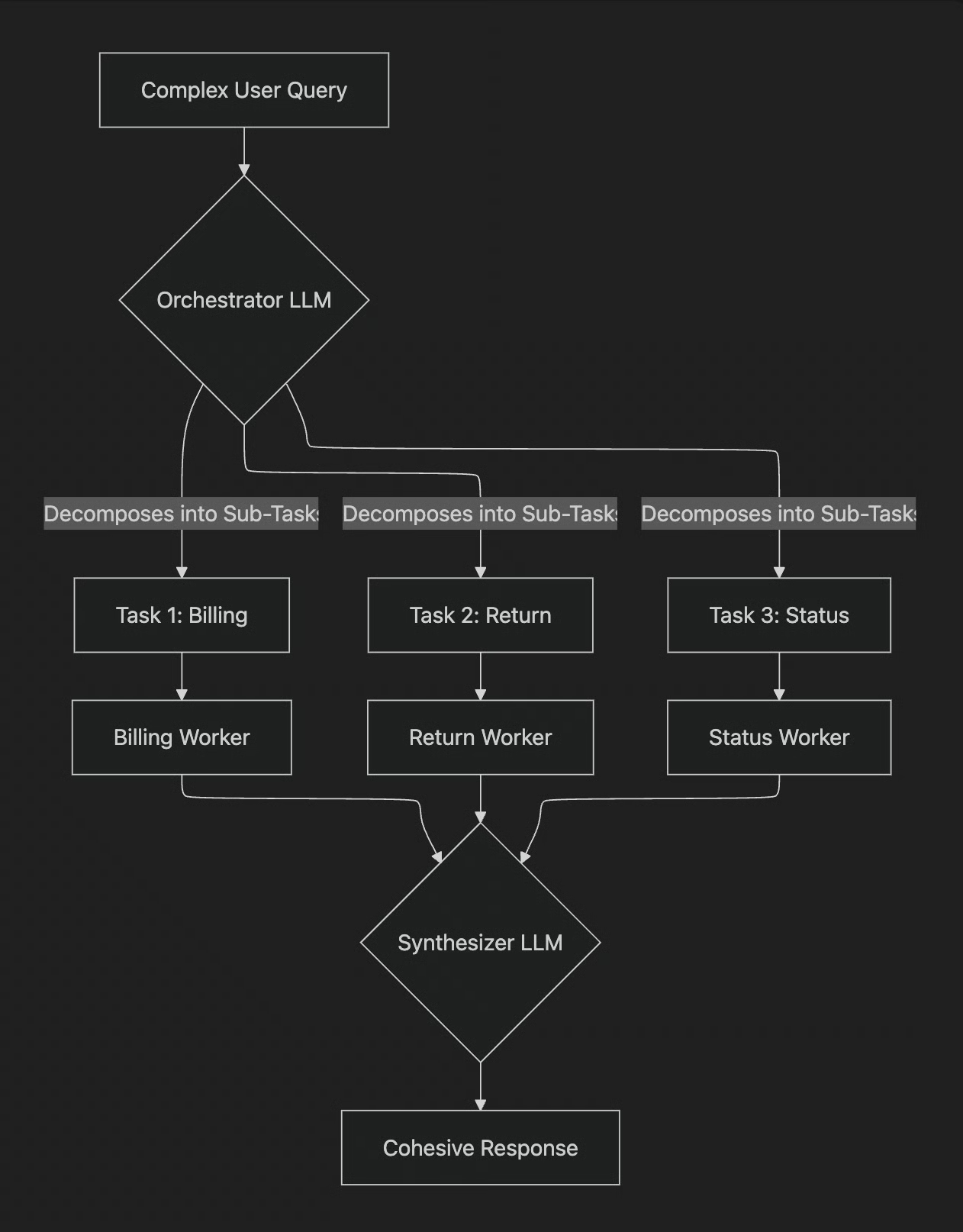 Figure 3: A flowchart illustrating the orchestrator-worker pattern.
The main pipeline function coordinates this entire flow.
When you feed it a complex query like, "Hi, I'm writing to you because I have a question about invoice #INV-7890. It seems higher than I expected. Also, I would like to return the 'SuperWidget 5000' I bought because it's not compatible with my system. Finally, can you give me an update on my order #A-12345?", the orchestrator first deconstructs the query into three tasks:
BillingInquiryforINV-7890ProductReturnforSuperWidget 5000StatusUpdateforA-12345
The workers process these tasks, and the synthesizer then crafts the final response:
This pattern elegantly handles complex, unpredictable inputs by dynamically decomposing the problem and synthesizing a complete solution, showcasing a significant step up in building sophisticated AI systems.
Conclusion
We have moved from the naive approach of a single, complex prompt to a more disciplined, engineering-driven methodology for building LLM applications. The core idea is simple but powerful: break down complex problems.
In this lesson, you’ve learned these fundamental workflow patterns:
- Chaining gives you control and debuggability for sequential tasks.
- Parallelization gives you speed for independent tasks.
- Routing gives you specialization for handling diverse inputs.
- Orchestrator-Worker gives you dynamic flexibility for the most complex problems.
Learning these workflow patterns forms the foundation for building more advanced agentic systems. In upcoming lessons, we will build directly on these concepts.
In Lesson 6 - Agent Tools & Function Calling, we will see how to give our workflows the ability to take 'actions' in the real world. Following that, in Lesson 7 - Planning & Reasoning, we will explore how to implement reasoning capabilities, allowing our agents to think and plan their steps.
References
- [1] Using Large Language Models for Failure Mode and Effects Analysis
- [2] Lost in the Middle: How Language Models Use Long Contexts
- [3] Prompt Engineering for LLMs: A Practical Guide
- [4] Enhancing Large Language Model Performance with Prompt Chaining
- [5] What is Prompt Chaining?
- [6] What is Prompt Chaining?
- [7] Prompt Chaining: The Secret to Unlocking Complex LLM Use Cases
- [8] What is Prompt Chaining?
- [9] What is Prompt Chaining?
- [10] Prompt Chaining is Dead. Long Live Prompt Stuffing.
- [11] Prompt Chaining: The Essential Technique for Complex LLM Applications
- [12] Rate limits
- [13] Generative AI on Vertex AI quotas and limits
- [14] Azure OpenAI Service quotas and limits
- [15] Rate limits
- [16] Workflow for routing
- [17] Workflows and Agents
- [18] Spring AI Agentic Patterns
- [19] AI Workflow Design Patterns
- [20] A Comprehensive Taxonomy of User Intent in Large Language Models
- [21] LLM-based Intent Classification
- [22] Intent Classification in NLP
- [23] 5 Tips to Optimize Your LLM Intent Classification Prompts
- [24] Intelligent LLM Routing in Enterprise AI
- [25] Building effective agents
- [26] Design Patterns for Building Agentic Workflows
- [27] Workflow for orchestration
- [28] Building effective agents
- [29] Spring AI Agentic Patterns
- [30] Orchestrator-Workers Workflow
- [31] Spring AI Orchestrator-Workers Workflow Guide